For auto repair shops, service stations and tire shops
Auto repair shop software: automation from check-in to profit
Work orders, clients and vehicles, parts warehouse, mechanics' payroll, cash desk and reports — instead of a notebook, Excel and three different programs.
- Runs in the browser
- Nothing to install
- All modules on every plan
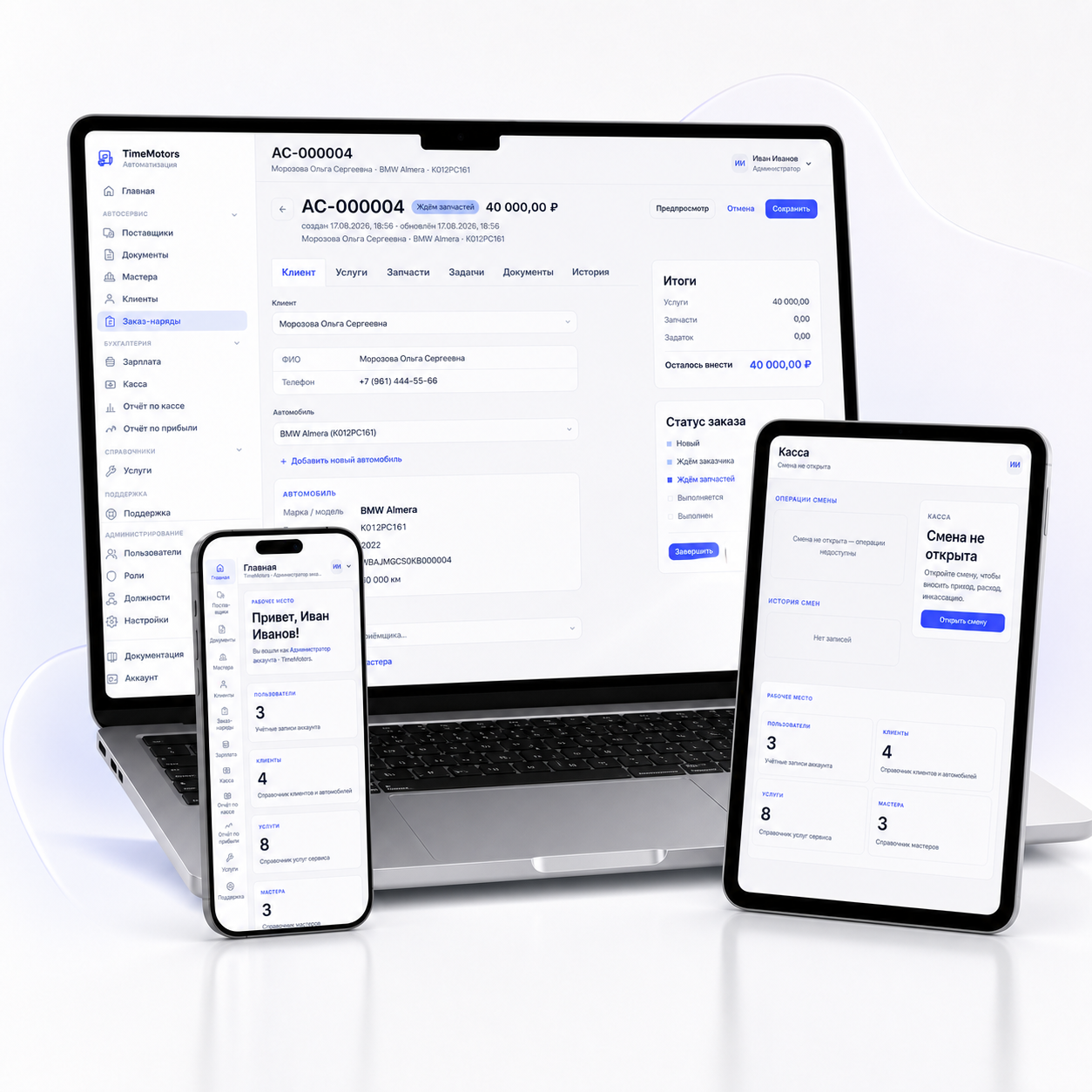
Client, vehicle, labor, parts — in one window. Printable forms are ready right away: work order, vehicle acceptance report, invoice. No need to copy the same details onto three pieces of paper.
Profit is calculated for every order: separately for labor and for parts. No need to reconcile notebooks at the end of the month — the report is already there.
Percentage, standard hour or fixed price — the system calculates from closed orders. Mechanics see what they've earned, and you see what's left to pay out.
Auto shop management software: what's included
All modules on every planClient, vehicle, services, parts, deposits, documents and the full change history — in one card.
Individuals, sole proprietors and companies with full details. For every car — VIN, plate number, mileage and everything ever done to it.
A booking widget for your shop's website: requests with statuses, a Telegram notification, and a work order from a request in one click.
A schedule for lifts, pits and test stands: an order is assigned to a bay for a time slot, and you can see when the bay will be free.
What the client postponed — on the vehicle card with mileage or a date; on the next order the service advisor sees it right away.
Mileage, fuel level, equipment, damage and the client's signature at intake, plus photos from the phone camera — right in the work order.
Defects with photos turn into labor and parts with one click; a diagnostic sheet by vehicle system. Both reports are available as PDF.
“Service 1”, “Oil change” and other standard sets of services and parts are added to the order in one click.
Work order, vehicle acceptance report, invoice, certificate of completion, contract — PDF and Word with your company details.
Supplier orders, receiving, write-offs and current stock — no parallel spreadsheet. Warehouse items can be added to a work order.
Part number search in ProfitLiga, AutoEuro, Armtek, Rossko and AutoSputnik right from the work order.
Three pay schemes, earnings from completed jobs, payout history for each mechanic.
Shifts, income and expenses, end-of-shift discrepancy, period report in PDF and Excel.
Parts margin, service revenue, mechanic costs — for any period.
Service advisor, mechanic, accountant, manager — each sees only what's theirs. Modules are enabled as needed.
What it looks like
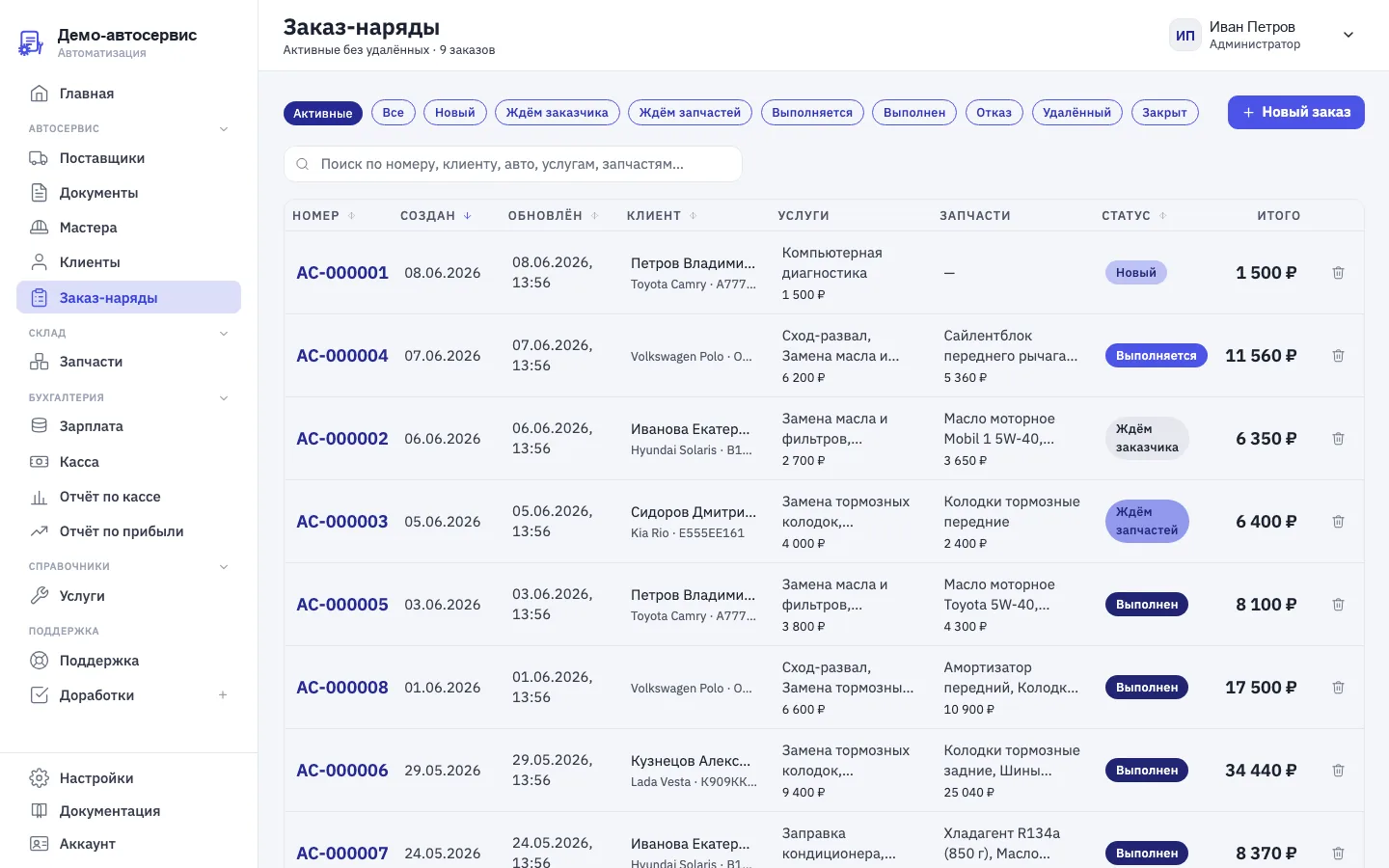
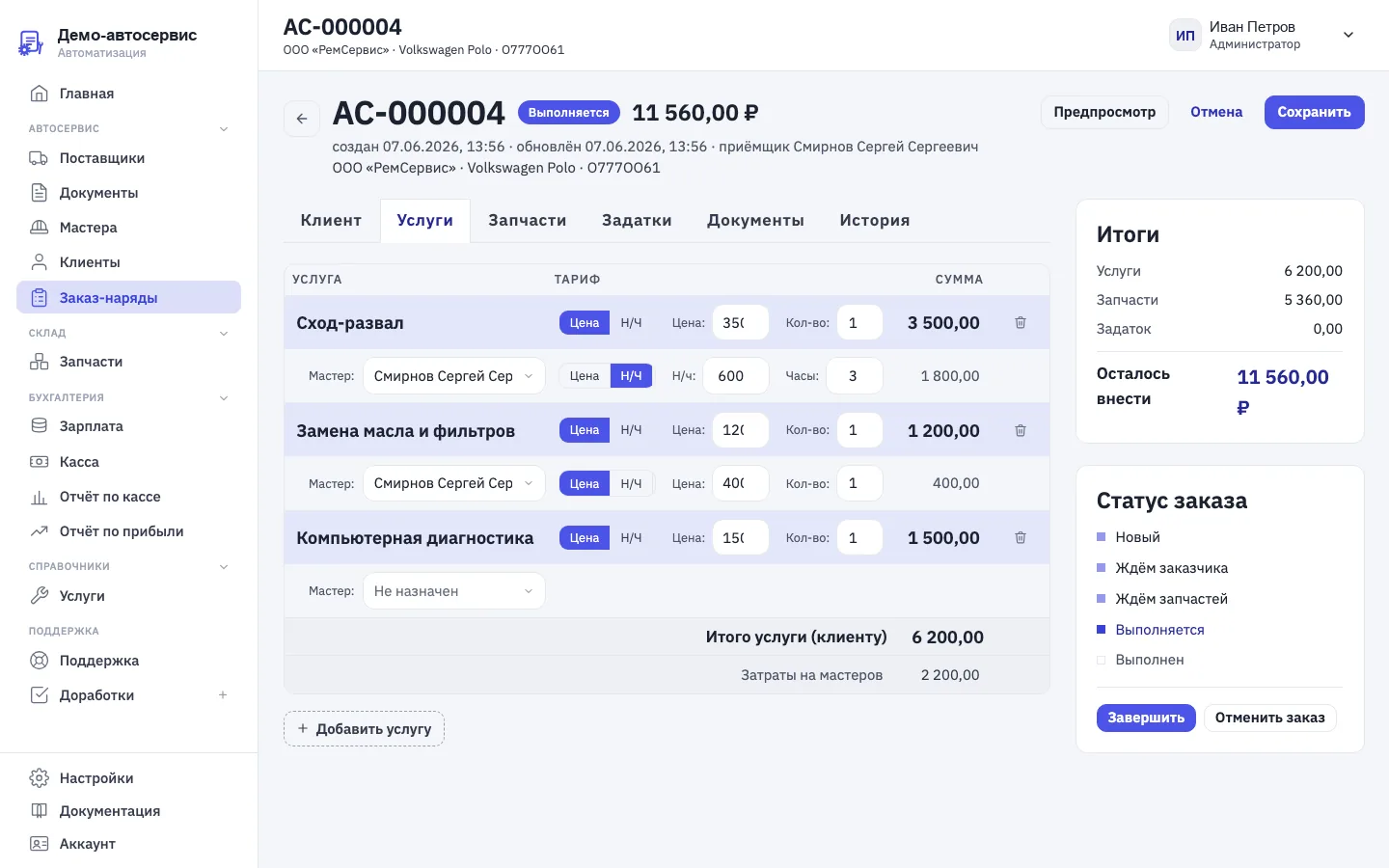
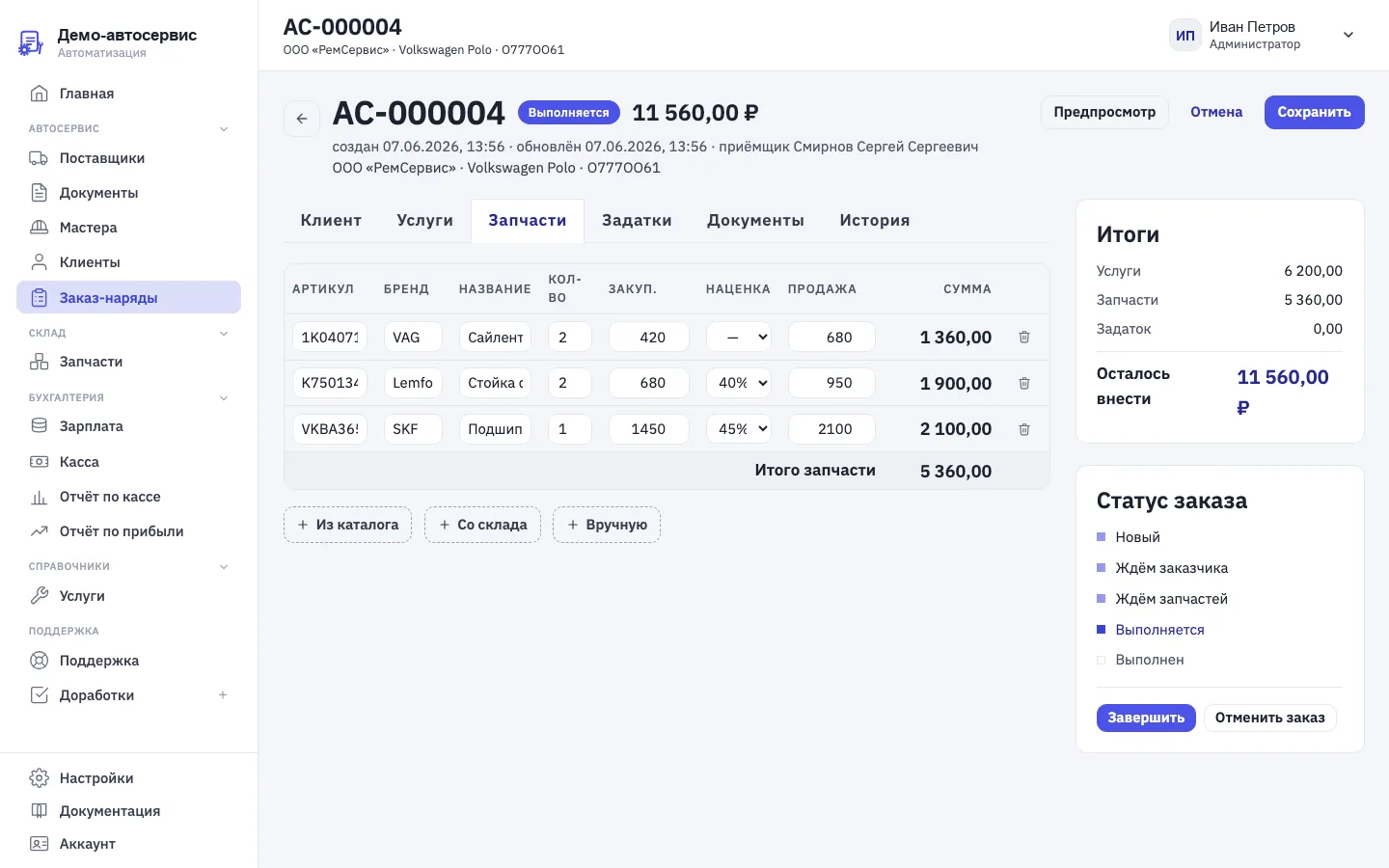
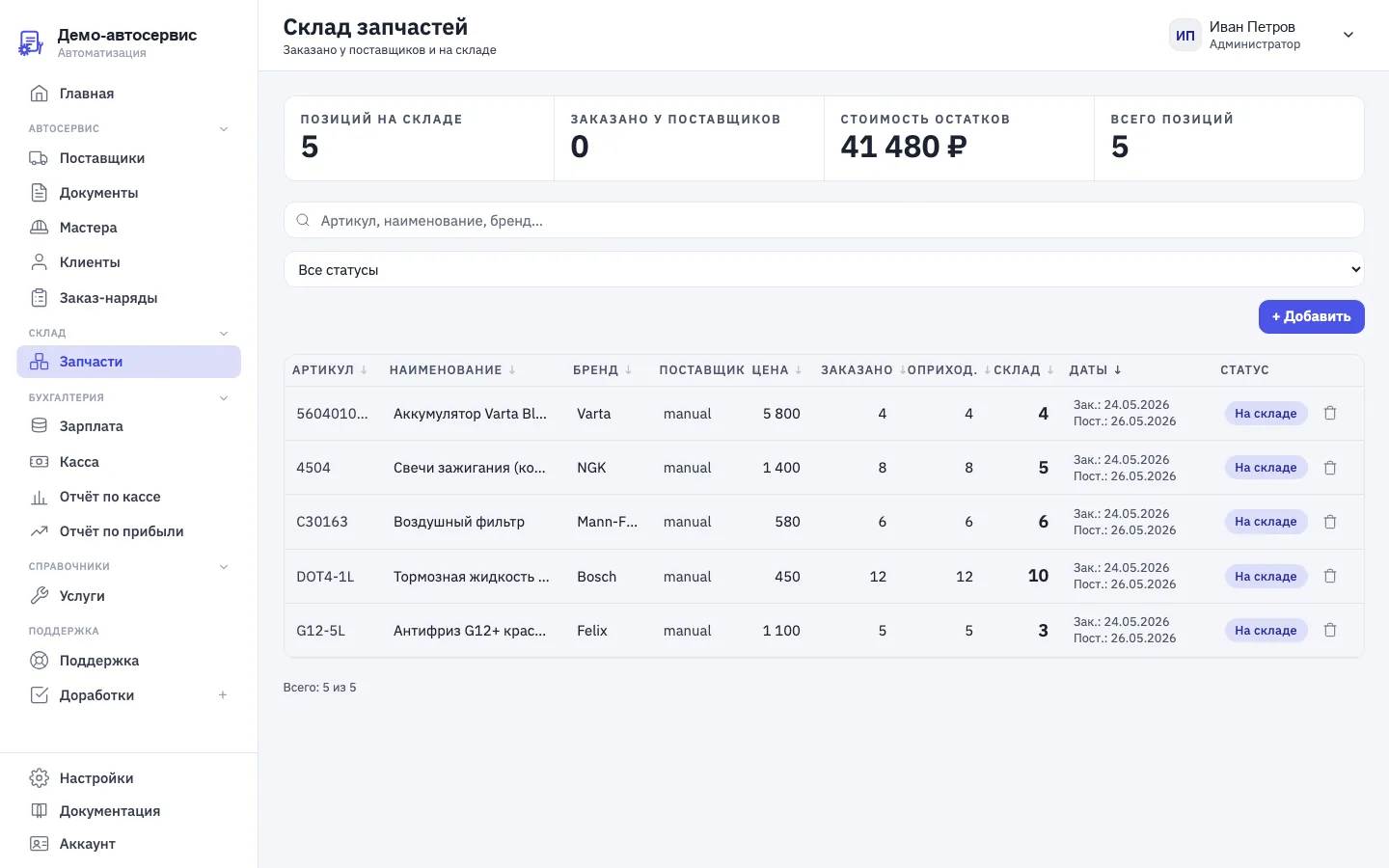
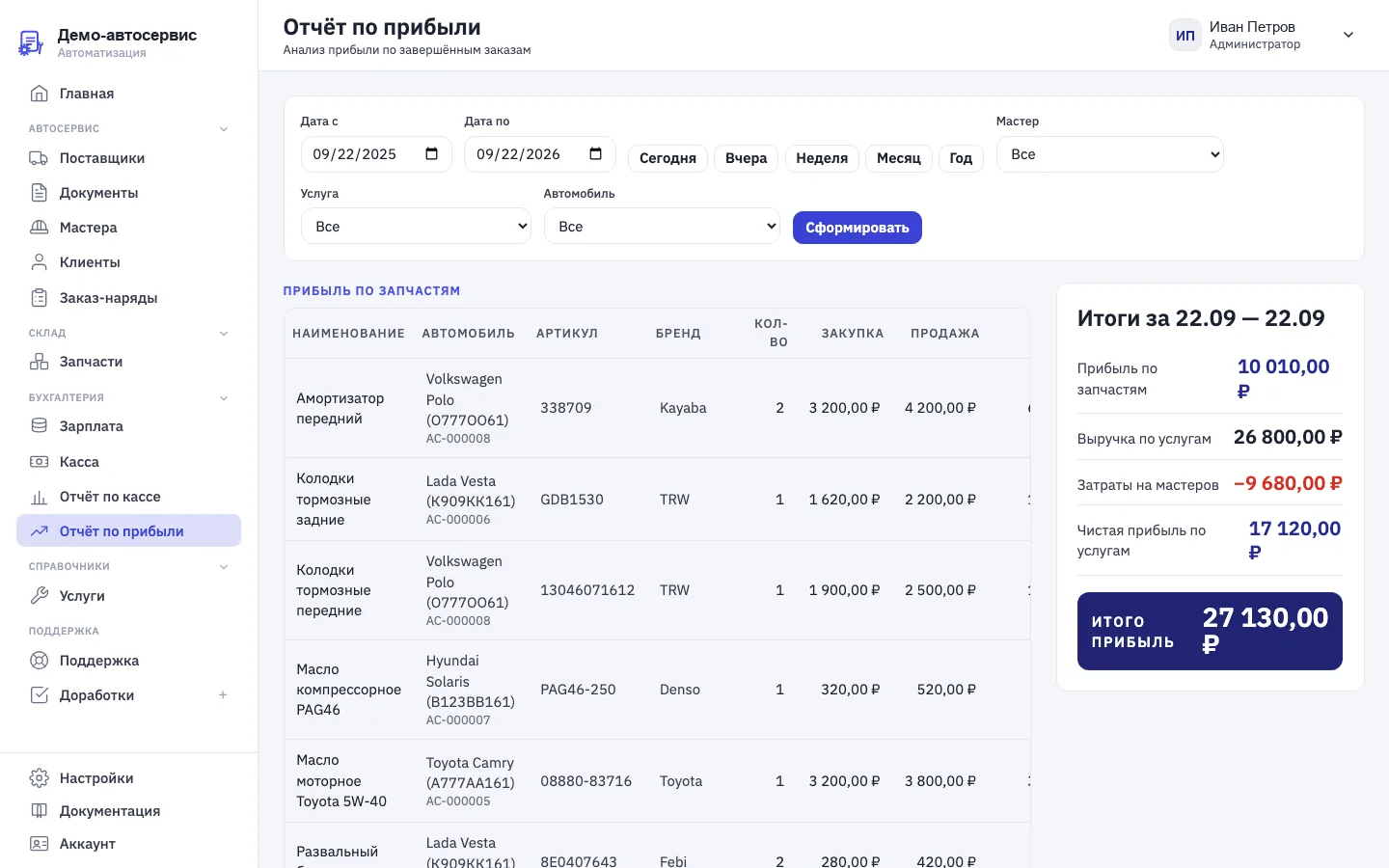
How an order flows through the software
From check-in to handover- 1. Check-in
Client and vehicle
Find the client by phone number or add a new one — an individual, a sole proprietor or a company with its details. Pick the car from the client's vehicles or add it with the license plate, VIN and mileage — the make and year are filled in from the VIN. On the Inspection tab you note the fuel level, equipment and damage, take photos with your phone, and the client signs on the screen. Then print the vehicle acceptance report.
- 2. Work order
Labor with assigned mechanics
Services come from your catalog; each one gets a mechanic and a pay method for their work: fixed price, standard hour or percentage. The amount for the client and the mechanic's pay are calculated instantly.
- 3. Parts
From stock or from a supplier
Pick a part from warehouse stock or search by part number in the ProfitLiga, AutoEuro, Armtek, Rossko and AutoSputnik catalogs. Each line shows the purchase price, markup and selling price.
- 4. Work
Statuses instead of phone calls
New, waiting for customer, waiting for parts, in progress, completed, declined. The service advisor and the owner see what stage each car is at without walking around the bays. Deposits are recorded with date and amount.
- 5. Handover
Documents and payment
Work order, certificate of completion, invoice and contract are generated with one click using your company details, in PDF and Word. Payment goes through the current cash desk shift and is linked to the order.
- 6. Result
Payroll and profit
A closed order automatically flows into mechanics' pay and the profit report: labor revenue, parts margin and mechanic costs — no reconciling notebooks at the end of the month.
Auto shop automation: what you stop doing by hand
Auto shop automation isn't “a computer at the front desk” — it's the point where the same data stops being entered several times over, and numbers you used to calculate by hand appear on their own. Here's what changes in a shop's work after switching to the software.
Which auto shops it's for
Auto repair shops, service stations, tire shopsSmall auto shop, 1–3 bays
The owner checks in cars and keeps the books personally. What matters most is a work order and documents in five minutes, a clear cash desk and seeing how much you've earned. The software replaces the notebook and Excel.
Shop with 4–8 bays
There's a service advisor, several mechanics and a parts warehouse. Here order statuses, payroll based on completed work, access rights and searching suppliers for parts from the order really pay off.
Multi-location chain, 9+ bays
Several locations in one account, roles and job titles for staff, a profit report across the whole business. Unlimited users on any plan.
How much auto repair shop software costs
All modules on every planThe plan depends only on the size of your shop: work orders, clients, documents, warehouse, suppliers, cash desk, payroll, the profit report and access rights are in every plan, with unlimited users. On sign-up 10 000 ₽ is credited to your account — 20–30 days of use, no card needed. Details are on the pricing page.
Cloud, boxed or 1C: which to choose
Auto shop software comes in three kinds. Boxed software is installed on a computer at the shop: it works without internet, but backups, updates and access from another device become your problem. 1C-based solutions are tightly integrated with accounting and highly customizable, but they require platform licenses, an implementation partner and paid support. Cloud software runs in the browser on a subscription: no server needed, setup takes a day, mechanics use it from their phones, and the owner can access the data from home.
AvtoServisOnline is cloud software. If the internet at your shop is unreliable, it's more honest to look at a boxed solution; if you already run 1C and have a contractor, look at an industry configuration. Prices of eight programs, taken from their websites, and formulas to work out the cost for your shop are collected in our auto repair shop software comparison.
How to get started
- Sign up — an account with all modules is created instantly, and 10 000 ₽ is credited to your balance.
- Fill in your shop's details: they'll appear on the work order, certificate, invoice and contract.
- Set up the service catalog with prices and how mechanics are paid for each job.
- Add employees and assign them roles — each will see only what's theirs.
- Migrate clients, vehicles and stock from Excel — how to do it without losing anything is covered in the article on moving from Excel.
- Run your first real orders through the software and check the profit report.
Step-by-step guides for every section are in the documentation.
FAQ
About auto repair shop softwareWhat is auto repair shop software and why do you need it?
It's a system where an auto shop handles all the work on a vehicle: check-in, the work order, parts, mechanics' work, payment and documents. Instead of a notebook, Excel and separate forms, data is entered once, and the order total, mechanics' pay and profit are calculated automatically.
How much does AvtoServisOnline auto repair shop software cost?
Three plans based on shop size: Start — 9 900 ₽ per month for 1–3 bays, Service — 14 900 ₽ for 4–8 bays, Network — 24 900 ₽ for 9 bays or more. All modules and unlimited users are included in every plan. On sign-up we credit 10 000 ₽ to your account — that's 20–30 days of use with no card required.
Do I need to install the software on a computer?
No, the software runs in the browser on a computer, tablet or phone. Servers, backups and updates are on our side. There's an iPhone app in the App Store.
Is there a mobile app for auto repair shops?
Yes. The AvtoServisOnline app is available for iPhone and iPad in the App Store, for Android as an APK file downloaded from our website, and for Windows and macOS. All versions work with the same account: a work order created on a phone next to the car shows up on the computer right away. From the phone you can check in vehicles with the client's signature, take photos, scan the VIN and license plate with the camera, change order statuses and record payments at the cash desk.
How do I choose auto repair shop software?
Auto repair shop software should keep all the work on a car in one database: check-in and inspection report, work orders with labor and parts, warehouse, mechanics' payroll, cash desk and profit report. Check whether you need to set up a server and buy licenses, whether the software works from a phone and what happens to your data when you replace a computer. AvtoServisOnline runs in the browser and in apps, all modules are included in every plan, and on sign-up we credit 10 000 ₽ to your account.
What can you automate in an auto shop with this software?
Vehicle intake with an inspection report and photos, defect inspection, online booking and service bay scheduling, work orders and document printing, order totals with markup on parts, inventory, parts search across suppliers, cash desk by shift, mechanic payroll based on completed work, and a profit report. Everything is connected: a closed order goes straight into payroll, the cash desk and profit.
Is the software suitable for a small auto shop?
Yes. Shops with 1–3 bays usually start with work orders, documents and the cash desk, and turn on other modules as needed — they're already included in the plan. The software doesn't need a dedicated system administrator.
Can I migrate data from Excel or another program?
Yes. Usually people migrate clients with their vehicles, the labor price list and warehouse stock — they're entered into the reference data once. Migration assistance is included in the support for the Service plan; see the pricing page for details.
How does the software calculate mechanics' pay?
Each job in the work order gets a mechanic and a pay method: a fixed amount per operation, standard hours at the mechanic's rate, or a percentage of the labor price charged to the client. The client price and the mechanic's pay are set independently, so changing the client price doesn't change the mechanic's pay if they're paid a fixed amount or by standard hours. Earnings accumulate from completed orders, and payouts are recorded in each mechanic's history — no need to tally the month's pay from a notebook.
What are the work order statuses and what do they change?
Seven values: New (order created, work not started yet), Waiting for customer (estimate needs approval), Waiting for parts (ordered from a supplier or waiting for stock to arrive), In progress (mechanic is working), Completed (ready for pickup), Declined (the client refused), Closed (the vehicle has been handed over and paid for, the order becomes read-only). The service advisor moves the status as work progresses, and the transition history is saved; when an order moves to Closed, its data goes into the cash desk, mechanics' pay and the profit report and no longer changes.
How does the software speed up vehicle check-in and handover?
The client is found by phone number, and the car is taken from their profile or added by VIN and license plate: the make and year are filled in from the VIN, and the VIN and plate themselves can be read with the phone camera. The Inspection tab records mileage, fuel level, equipment, damage, photos and the client's signature, and the history of past visits opens on the same page. Services are picked from the catalog by name, the price or standard hours are set in the order line, and parts come from the catalogs of five suppliers or from your stock. Printed documents (vehicle acceptance report, work order, invoice, certificate of completion) are generated automatically with the shop's details, and each document has its own number and date. At pickup, the client's deposits are deducted from the invoice, the order status changes to Closed and the amount goes to the cash desk — the service advisor doesn't retype the same data in three places.
How do I see my auto shop's profit for the month?
In the profit report for any period. It's built from completed work orders and shows three parts: profit on parts (sale minus purchase for each line, with loss-making lines highlighted), labor revenue, and mechanic costs. The bottom line is parts profit plus labor revenue minus payouts to mechanics. You can filter the report by mechanic or service and see which jobs actually make money.
How do I manage the price list and service catalog in the software?
The Services catalog stores the names of the jobs your shop does; the client price is set on the work order line — as a fixed amount with quantity or as a standard hour rate with hours, and the software calculates the total. If a job is missing, the service advisor creates it right from the selection window, and an exact name match won't create a duplicate. Renaming a service updates the name in all orders and in the profit report; a service that's already used in orders can't be deleted. The profit report groups revenue and mechanic payouts by service name, so a single catalog shows which jobs make money.
How do I find parts from suppliers right from the work order?
A part number search runs across five connected suppliers at once: one table shows price, availability, delivery time and an alternative-part flag. The chosen item goes into the order with its purchase price, markup (30% by default, adjustable per line) and selling price, which is recalculated automatically. A part from your own stock is added with the “From stock” button, and the stock is written off as a separate action. Parts profit — sale minus purchase for each line — goes into the profit report.
Who can see purchase prices and salaries?
Whoever you allow. Access is configured with roles and rights per module: a mechanic sees their own jobs, a service advisor sees clients, orders and the cash desk, and the owner sees everything, including purchase prices and the profit report.
How is cloud software different from boxed software and 1C:Autoservice?
Boxed software is installed on the shop's computer, and backups and updates are your responsibility. 1C-based solutions require platform licenses and usually an implementation partner. Cloud software runs in the browser on a subscription, gets up and running in a day and needs no server. A detailed comparison with other programs' prices is in our auto shop software review.
Useful when choosing software
Eight programs, three pricing models, and how to work out the price for your shop.
Auto repair shop CRMClients, vehicles and repair history in one card.
Software for service stationsWork orders, parts and mechanics' pay at a car service station.
Software for truck repair shopsA company's vehicle fleet, different standard hour rates, downtime while waiting for parts.
Software for an auto shop with a parts storeSearch across five suppliers, markup on the order line, warehouse and parts margin.
Auto shop bookkeepingWhat to track, how to do it and where to start.
Work order softwareHow working with an order is organized, from creation to vehicle handover.
Moving from Excel to softwareWhat to migrate and how to survive the first week.
Try it on your own orders
Create a few work orders and you'll see how profit, mechanics' pay and stock levels are calculated. The account is created instantly, and we'll help you migrate clients and vehicles from your current system.
Already using the system? Sign in to your account