Taxes and deadlines: feed and limits
The “Taxes and deadlines” tab is the first thing you see in “Accounting & taxes”: income from the beginning of the year, tax due, contributions, regime limits, and a “what to file and pay” feed for 3 months in advance. A push notification may arrive in the app 3 days before the deadline.
The calculation is based on your data, and you sign it. Discuss any disputed cases with your accountant.
Where to find it
Path: Accounting → Accounting & taxes → “Taxes and deadlines” tab. It opens by default. Any employee with permission for the “Accounting & taxes” module can view it.
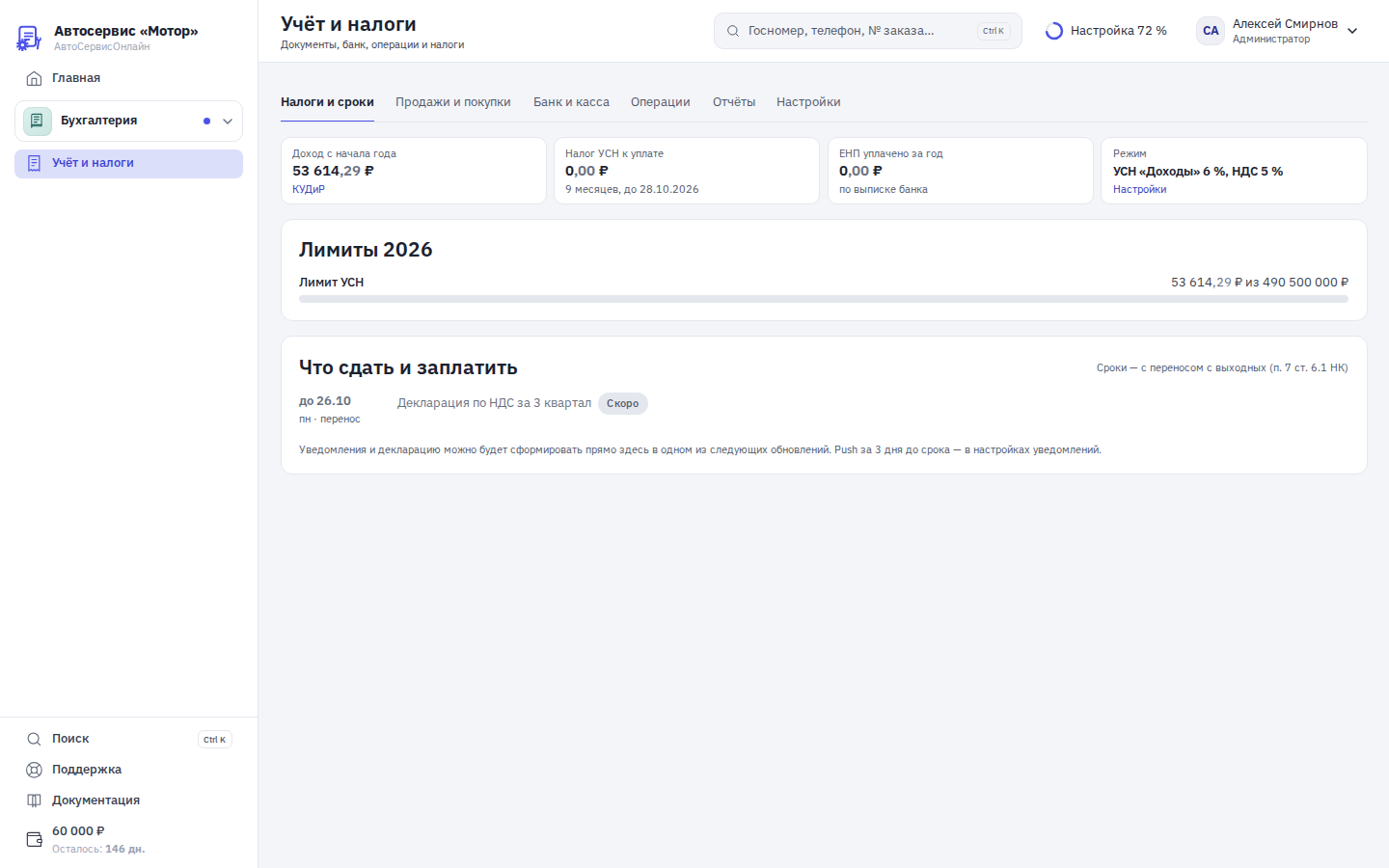
Tiles
- “Income from the beginning of the year” — from KUDiR; with a patent below the amount, this is “income under the patent”.
- “USN tax due” — the next advance payment or annual tax: “Q1, by 28.04” or, while the quarter is in progress, “…: as of today, period in progress”. For details, see USN tax and advance payments. Under AUSN — “The FTS calculates the AUSN tax”; under OSNO — “Coming soon”.
- “Individual entrepreneur contributions for the year” (for individual entrepreneurs), with “ENP paid” below; for organisations — “ENP paid for the year” based on the bank statement. See Individual entrepreneur contributions for themselves.
- “Mode” — the regime and VAT as of today, with a “Settings” link.
If no regime is specified, a banner appears at the top: “Specify the tax regime — KUDiR, tax, and deadlines depend on it.” and the “Specify regime” button. If accounting in the program did not start on 1 January, a banner with the “Enter details” button appears: see Accounting did not start on 1 January.
Limits
The “Limits …” card displays progress bars for your regime, comparing income from the beginning of the year with the threshold:
| Band | Threshold | What happens if exceeded |
|---|---|---|
| “USN limit” | 490.5 million ₽ | The right to use USN is lost from the start of the quarter |
| “Patent limit (PSN + USN)” | 20 million ₽ | The patent expires |
| “VAT exemption” | 20 million ₽ | From the next month, VAT and invoices are required |
| “AUSN limit” | 60 million ₽ | AUSN cannot be applied |
The bar is green up to 80%, yellow from 80%, with the label “More than 80% of the limit.”, and red from 100%, with “Limit exceeded.”. Example: PSN + USN income of 16.5 million out of 20 million is 82.5%, so a warning is displayed. The thresholds come from the reference data for the year; if a value is still being verified, the bar displays “The limit for this year is still being refined”.
“What to file and pay” feed
Deadlines for 3 months in advance. Each row includes “by …” and the day of the week, “in N days”, the amount, and an action:
- “USN advance payment notification: …” — by the 25th of the month following the quarter;
- “USN advance payment (ENP): …” — by the 28th. If the advance payment is 0, there is neither a notification nor an advance payment;
- “USN declaration for … year” and “USN tax for … year (ENP)” — for individual entrepreneurs, by 25 and 28 April; for organisations, by 25 and 28 March;
- “Individual entrepreneur contributions for themselves for … year” — by 28 December; “Individual entrepreneur contributions of 1% above 300,000 ₽ for … year” — by 1 July of the following year;
- “Patent …: first third”, “two thirds”, or “payment” — according to the patent schedule;
- under AUSN — transactions bypassing the bank by the 5th and the tax specified in the FTS notification by the 25th.
A deadline falling on a non-working day is moved to the next working day, with a “shifted” note under the date. Example: an individual entrepreneur’s declaration for 2026 is due on Sunday, 25.04.2027, so the deadline is 26.04.2027.
Buttons in the row:
- “Generate” — for notifications and declarations: the program immediately generates a report and opens the “Review” screen with an XML file for the personal account or operator — see Reporting. Without the “Reporting and closure” permission, the button is replaced with a “Reporting” link.
- “QR and payment slip” — for ENP payments with an amount: a QR code for the banking app and a file for online banking — see ENP: QR and payment slip.
- “Calculation” — for USN rows; opens USN tax and advance payments.
“Coming soon”. Deadlines that the program does not yet calculate are displayed in grey with a “Coming soon” badge: the VAT declaration, personal income tax, and contributions for employees, corporate income tax, and 3-NDFL. File these through your accountant or operator.
Push notification 3 days before the deadline
Three days before the deadline, the mobile app sends a push notification, for example, “Deadline 26.04: USN declaration”. It does not include amounts. The account administrator and employees with the “Reporting and closure” permission receive it. To disable it — Settings → Notifications → “Push notifications” card → “Tax and reporting deadlines”. “Coming soon” items are not sent.
AUSN
Under AUSN, KUDiR is not required: the FTS calculates the tax based on bank and cash desk data. In “Reports” → “AUSN”, select the month:
- “Transactions bypassing the authorised bank” — cash and transfers without a statement line. You must enter them in the AUSN personal account by the 5th of the following month. The FTS will receive online cash desk payments with receipts from the fiscal data operator — compare the list with the receipts.
- “Tax for the month — reference figure”, with the note “The FTS calculates the tax”: 8% of income or 20% of income minus expenses, but no less than 3% of income.
FAQ
- Why is there no quarterly advance payment in the feed? An advance payment of 0 means that individual entrepreneur contributions covered the tax. No notification or rows are needed in this case.
- The deadline in the feed does not match the calendar. The deadline fell on a non-working day and was moved to a working day — it displays “shifted” under the date.
- No push notification about the deadline arrived. Check the “Tax and reporting deadlines” checkbox, the “Reporting and closure” permission, and make sure that the app is installed and notifications are allowed. The push notification is sent once — 3 days in advance, at 10:00 Moscow time.
- There is no “Generate” button. The employee does not have the “Reporting and closure” permission — the button is replaced with a “Reporting” link where the report can be opened. If the advance payment is 0, the notification row is not displayed in the feed and does not need to be filed.
- The limit bar is yellow. Income is more than 80% of the threshold. Discuss with your accountant how to avoid losing the regime.