Reconciliation statement
The statement of reconciliation of mutual settlements shows who owes whom as of a certain date: how much work you have completed and how many parts you have shipped to the client, how much they have paid — or how much the supplier has delivered and how much you have transferred to them. The program compiles it automatically from orders, payments, receipts, and the bank statement. This section is available in the Accounting & taxes module.
Where to find it
Path: Accounting → Accounting & taxes → “Sales and purchases” tab → “Reconciliation statement” section. Any employee with module access can view the statement; the account administrator and employees with the “Keep records” permission can “Generate” the document.
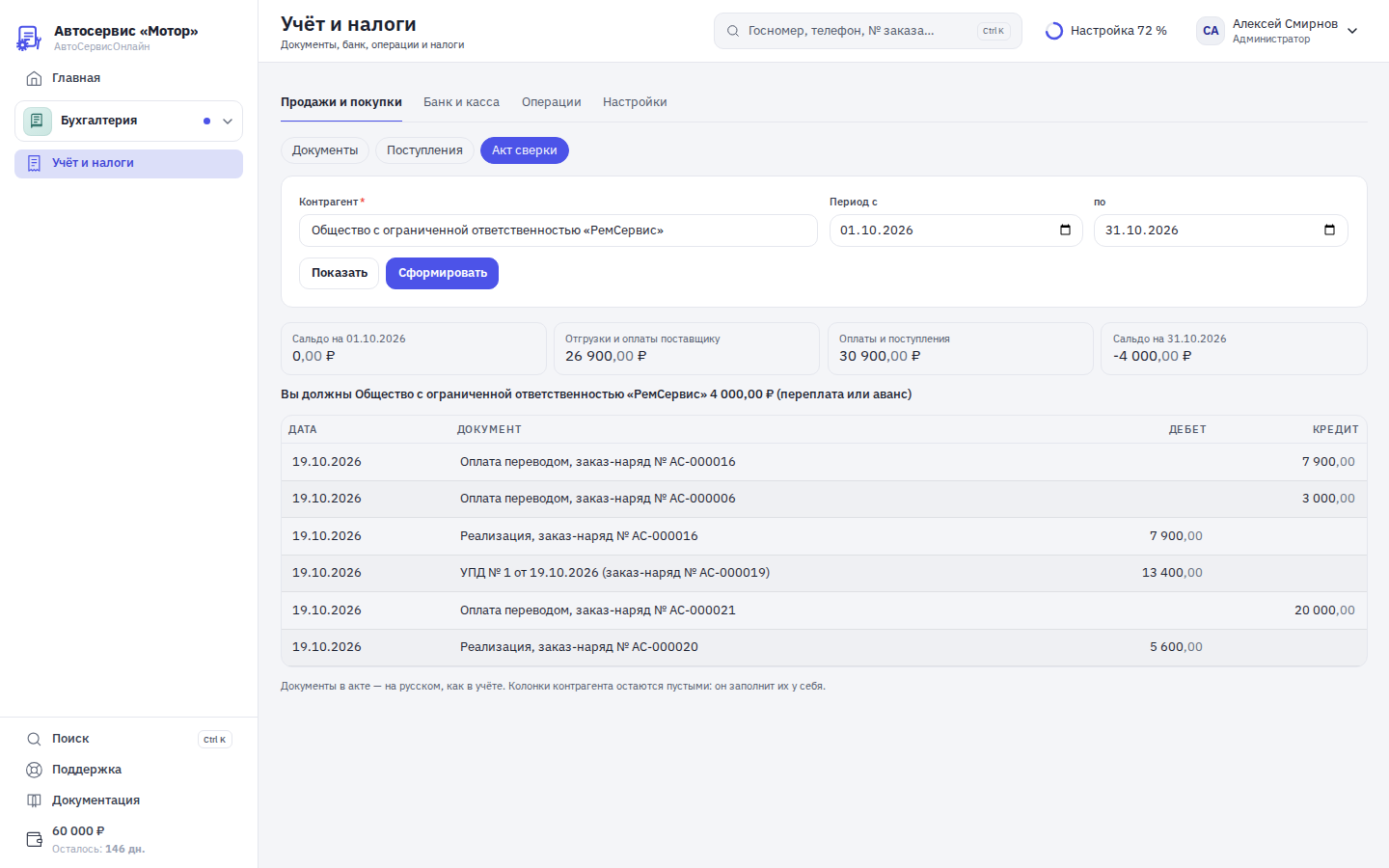
Generate the statement
- “Counterparty” — start entering the name, full name, or tax ID of the client or supplier.
- “Period from” and “to” — by default, from the beginning of the current quarter to the end of the current month. The period cannot exceed 3 years.
- Click “Show” — a preview will appear.
- If everything matches, click “Generate”: the statement will be saved in the document registry, and the “Download PDF” and “Download Word” buttons will appear.
What is included in the preview
- “Balance as of …” (beginning of the period) — debt as of the first day of the period.
- “Shipments and payments to the supplier” — debit: sales based on completed orders, your payments to the supplier, and refunds to the customer.
- “Payments and receipts” — credit: customer payments in cash, by transfer, and by card, as well as receipts from the supplier and refunds from the supplier.
- “Balance as of …” (end of the period) and a summary in a single phrase: “… owes you N ₽”, “You owe … N ₽ (overpayment or advance payment)”, or “Settlements are closed — there are no outstanding debts”.
- Transaction table: “Date”, “Document”, “Debit”, “Credit”.
The “according to the counterparty’s records” columns in the document remain empty — the counterparty will fill them in, sign the document, and return it. The statement contains signatures from both parties. Document names in the statement are shown in Russian, as they are in the accounting records.
Where the figures come from
The statement is compiled from operations (the “Operations” tab, see Bank & cash desk):
- sales — from orders with the “Completed” or “Closed” status, based on the completion date; the client’s parts are not included;
- client payments — from the “Payment” tab of the order; a transfer matched to the bank statement uses the transaction date from the statement;
- receipts — posted receipts from suppliers;
- payments to the supplier and refunds from the supplier — from the allocated bank statement.
Therefore, before reconciling with a supplier, upload the bank statement and enter their UPD and invoices. Before reconciling with a client, check the payments in the orders.
The opening balance is calculated from the “Start keeping records from” date (the “Settings” tab). If the period starts earlier, the program will display a warning: “Records have been kept since …: there are no transactions before this date — the opening balance was calculated from that date”. Debts incurred before the start of accounting will not be included in the statement.
Registry and cancellation
The generated statement is available in the “Documents” section of the “Sales and purchases” tab, under the “Reconciliation statements” type filter. Numbers are generated in a separate series, starting from the beginning of the year. PDF and Word files are available under ⋮ next to the relevant row. A statement cannot be changed after generation: if the data needs to be corrected, select ⋮ → “Cancel…”, specify the reason, and generate a new statement.
FAQ
- The balance does not match the client’s records. Make sure that all payments have been entered in the orders and that the bank statement for the period has been uploaded and allocated: a transfer that was not allocated will not be included in the statement. Compare the transaction table with the client’s records line by line — any discrepancy can be identified by date and amount.
- An order is missing from the statement. It has not been moved to “Completed” or “Closed”, or it was completed before the “Start keeping records from” date.
- The “Generate” button is missing. The “Keep records” permission is required. After the statement is generated, the button remains inactive until you change the counterparty or the period.
- “The reconciliation statement period must start in 2000 or later, must not exceed 3 years, and the ‘to’ date must not be earlier than the ‘from’ date.” Shorten the period.