USN Tax and Advance Payments
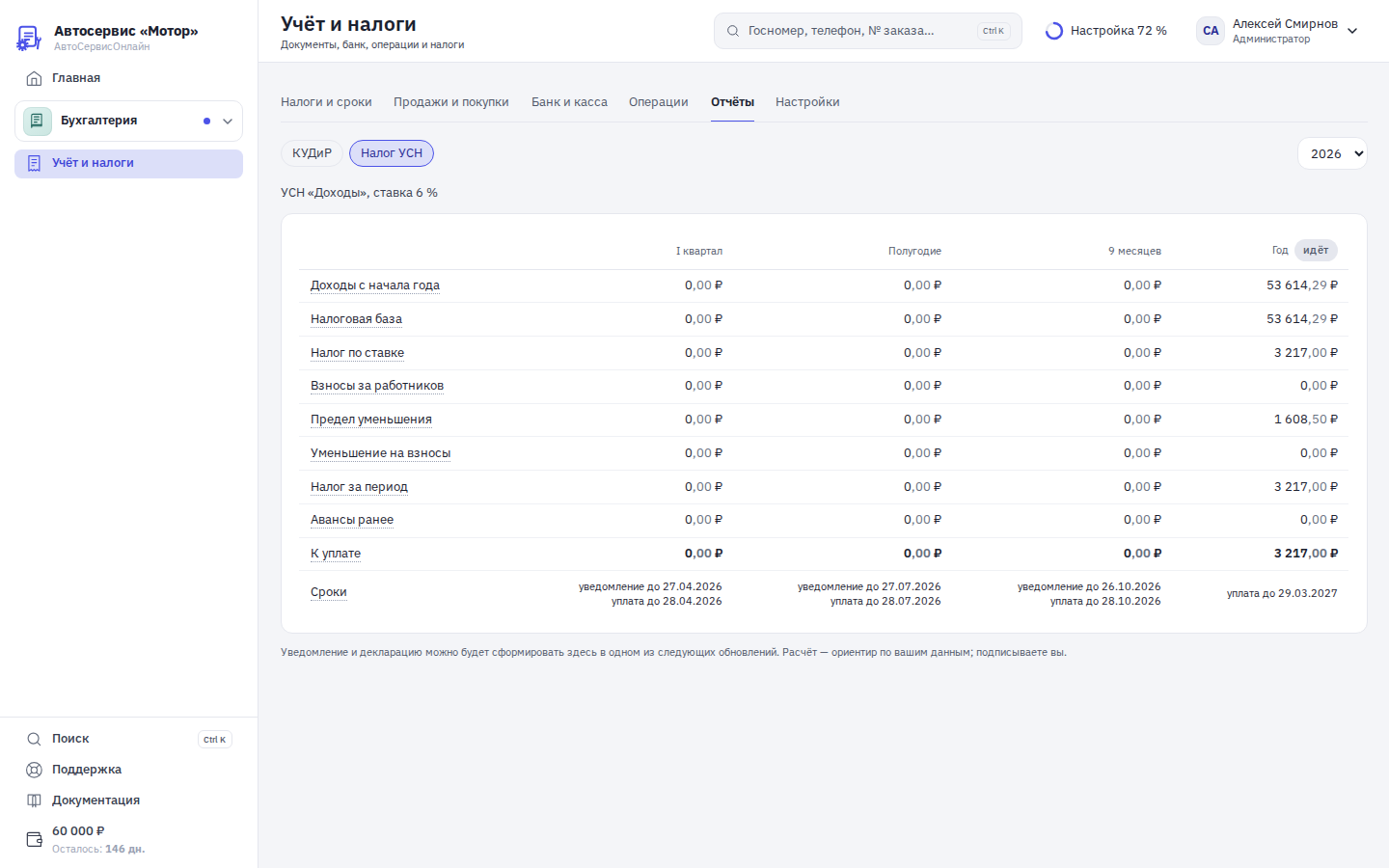
The program automatically calculates the USN tax and advance payments for the first quarter, half-year, and nine months based on KUDiR, contributions, and initial data. It works for USN “Income” (6% or the reduced regional rate) and “Income minus expenses” (15% or the reduced rate): reduction by contributions, minimum tax, loss carryforward, and overpayment of advance payments. Every figure references a provision of the Tax Code.
The calculation is based on your data, and you sign it. Discuss any disputed cases with your accountant.
Where to find it
Path: Accounting → Accounting & taxes → “Reports” tab → “USN tax”, with “Year” at the top right. The nearest amount due is shown on the “USN tax due” tile in the “Taxes and Deadlines” tab, and the “Calculation” link in the deadlines feed leads here.
KUDiR and taxes are recalculated until the month is closed. If you correct a payment or expense retrospectively, the ledger and advance payment will change the next time you open the screen (the top displays “Updated at …”, and the “Refresh” button updates it immediately). A closed month locks the figures — see Month for the accountant and closing.
What the calculation includes
Columns: First quarter, Half-year, Nine months, Year; the ongoing period is marked “in progress” and calculated as of today. Lines:
| Line | Description |
|---|---|
| Income from the beginning of the year | From KUDiR, on a cumulative basis |
| Expenses from the beginning of the year | Only for “Income minus expenses” — paid expenses from KUDiR |
| Loss from previous years | “Income minus expenses”, only for the year |
| Tax base | Income (or income minus expenses) |
| Tax at the rate | Base × rate, in whole rubles |
| Sole proprietor contributions for themselves, Contributions for employees | “Income”: what can be deducted from the tax |
| Reduction limit | The entire tax for a sole proprietor without employees; otherwise 50% |
| Reduction by contributions | How much the contributions reduced the tax |
| Minimum tax | “Income minus expenses”, only for the year: 1% of income |
| Tax for the period | After the reduction or the minimum tax, marked “minimum” |
| Previous advance payments | Advance payments calculated for previous periods |
| Amount due | Tax for the period minus previous advance payments, not less than 0 |
| Deadlines | “notification by …”, “payment by …” |
Hover over a line name to see the Tax Code provision. On mobile, each period is displayed as a separate item card, with the Tax Code provision shown below the line.
USN “Income”: reduction by contributions
- A sole proprietor without employees reduces the tax by contributions for themselves in full — both fixed contributions and the 1% contribution. The fixed contributions for the year reduce the tax already for the first quarter, even if they have not yet been paid.
- A sole proprietor with employees and a company — reduce the tax by contributions for themselves and for employees, but by no more than 50% of the tax.
Example (2026, sole proprietor without employees): income 2,400,000 ₽ → tax 144,000 ₽, contributions 57,390 + 21,000 = 78,390 ₽ → amount due 65,610 ₽. With the same figures and contributions for employees of 120,000 ₽, the reduction is limited to 72,000 ₽, amount due 72,000 ₽.
Cumulative advance payments in the same example: first quarter 0, half-year 10,610 ₽, nine months 30,000 ₽, and for the year an additional payment of 25,000 ₽ — 65,610 ₽ in total.
Employees are configured in “Settings”, in the “Employees and contributions for them” item card: “Has employees since”, “No employees since” (if all employees have been dismissed), and contributions for employees paid in each month — from payment terminals or CSV, as long as the program does not have the “Payroll” module. The 50% limit applies from the period when employees appeared; previous advance payments are not recalculated.
The 1% on income over 300,000 ₽ reduces the tax for the current or next year — the “1% on income over 300,000 ₽ reduces the tax” field in “Settings”: “For the same year” or “For the next year”. The program accounts for the 1% only once. If you reduce the current year's tax by 1% for the previous year, enter it in the “Initial data” item card, in the “1% for the previous year, ₽” field.
USN “Income minus expenses”: minimum tax and loss
- The annual tax is no less than the minimum tax — 1% of income. Example: income 10,000,000 ₽, expenses 9,500,000 ₽ → tax 75,000 ₽ is less than the minimum tax → amount due 100,000 ₽; the difference of 25,000 ₽ can be recognized as an expense in subsequent years.
- Loss from previous years reduces the base only for the annual tax, not advance payments. Enter it in “Settings”, in the “Loss from previous years, ₽” field.
- If the advance payments exceed the annual tax, the amount due is 0, and “to be offset” is shown below the amount along with the overpayment.
Accounting does not start on 1 January
If “We start accounting on” in “Settings” is not January, the program does not know what happened earlier. In this case, the “Taxes and Deadlines” tab will display a banner reading “Accounting in the program started on … Enter income, expenses, and advance payments from the beginning of the year — otherwise the annual tax will be calculated incorrectly” and an “Enter data” button. In the “Start of work” item card on the Home page, this is the “Enter income and advance payments from the beginning of the year” step.
The “Initial data …” item card in the “Settings” tab (only the account administrator can fill it in):
- “Income from the beginning of the year, ₽” — as in KUDiR, excluding VAT;
- “Expenses from the beginning of the year, ₽” — only for “Income minus expenses”;
- “USN advance payments for previous quarters, ₽” — calculated amounts from notifications;
- “Contributions for employees paid, ₽” — from 1 January until the start of accounting;
- “Patent income, ₽” — for the patent limit;
- “1% for the previous year, ₽” — for sole proprietors.
Click “Save”. Obtain the totals from your KUDiR or from your accountant for the period from 1 January to the day before accounting starts.
Periods that ended before accounting started are marked “before the start of accounting” in the calculation. Subsequent periods are calculated from the initial data and transactions. Example: accounting starts in July, advance payments for the half-year are 30,000 ₽, and income for nine months is 1,500,000 ₽ → tax 90,000 − contributions 69,390 = 20,610 ₽, which is less than the already calculated 30,000 ₽ → amount due 0, to be offset 9,390 ₽.
Deadlines
The advance payment notification is due by the 25th of the month following the quarter, and the advance payment is due by the 28th. Annual return: sole proprietor — by 25 April; company — by 25 March; annual tax — by 28 April and 28 March. If the deadline falls on a non-working day, it moves to the next working day: the sole proprietor's return for 2026 is due by 26.04.2027. All deadlines are shown in the “Taxes and Deadlines” feed.
Notifications and the return are generated from this calculation: click the “Generate” button in the deadlines feed or go to “Reports” → “Reporting” — an XML file for the personal account or operator and a printable form, see Reporting. To pay an advance payment, click the “QR and payment form” button in the feed, see ENP.
FAQ
- Why is the advance payment 0? The sole proprietor's contributions for themselves exceed the tax for the period, or previous advance payments exceed the tax on a cumulative basis. This is normal: a negative advance payment is not paid, and the overpayment is shown as “to be offset”.
- Why is the tax higher than the accountant calculated? Check “Has employees since” (the 50% limit), the “1% on income over 300,000 ₽ reduces the tax” setting, the initial data, and whether the statement for all months has been uploaded. Hover over a line to see the rule.
- Why is the income lower than the payments? You are a VAT payer — USN income excludes VAT. Or card payments have not yet been credited by the bank — see KUDiR.
- The regional rate is below 6%. Specify it in “Settings” → “Change from date” → “Reduced regional rate, %”.
- The message “Some rates and limits for this year are still being clarified”. For the current year, the reference data contains values that are still being checked against the text of the law. Check the figures with your accountant.