Mode, VAT and FNS details
The Settings tab of the Accounting & taxes module: tax regime and VAT from a date, patents, details for the FNS, accounting start date and accounting policy, initial data, employees and contributions for them. These settings determine whether UPDs and invoices are issued with or without VAT. Only the account administrator can change them; an employee with the View permission can only see them read-only.
Where to find it
Path: Accounting → Accounting & taxes → the Settings tab. From the Taxes and deadlines tab, the Set the mode and Enter the data buttons and the Settings link on the Mode tile lead here. From the Sales and purchases tab — the Change from date link (or Set the mode, if the mode has not been set yet) in the Currently: … row.
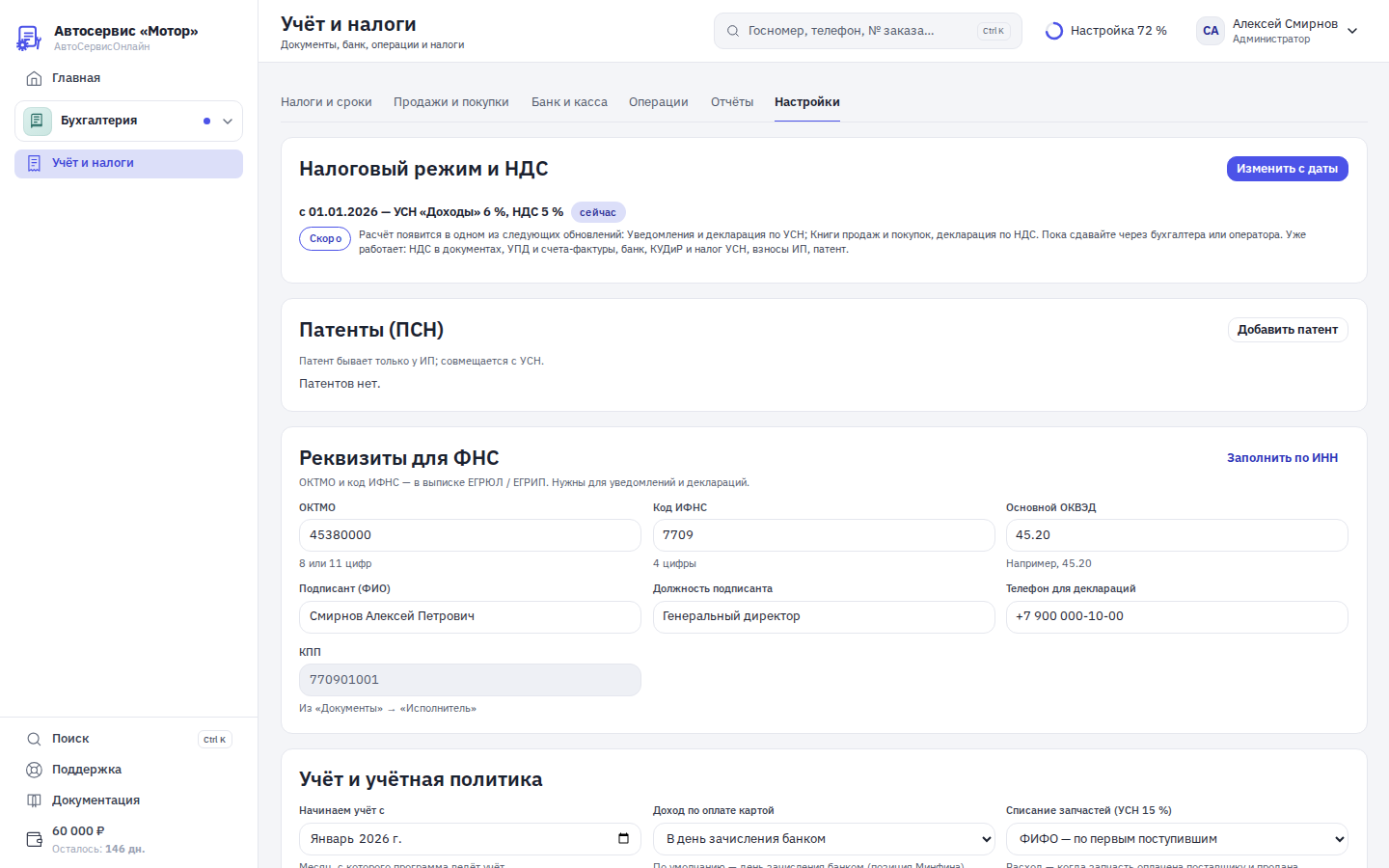
Tax regime and VAT
The mode and VAT are set from a date: each period lasts until the beginning of the next one. This way the program knows which mode was in effect on the date of any document, and changing the mode in the future does not affect the past.
- In the Tax regime and VAT card, click Change from date.
- In the Mode and VAT from date dialog, specify From the date — usually January 1 or the registration date.
- Select the Tax regime: USN Income 6 %, USN Income minus expenses 15 %, AUSN Income 8 %, AUSN Income minus expenses 20 %, or OSNO (general system).
- For USN, if necessary, enter Reduced regional rate, %: Income — from 0 to 6 %, Income minus expenses — from 0 to 15 %. Empty means the general rate.
- Select VAT: Non-payer (exemption), 5 %, 7 %, or 22 %. Click Save.
The 22 % rate is the general one: in documents before 2026 the program automatically prints 20 %. Under USN without VAT, you can work with income of up to 20 million ₽ for the previous year; beyond that — 5, 7, or 22 %.
The program will not let you save: under OSNO — 5 or 7 % (only 22 % or exemption); under AUSN — any VAT (under AUSN it is not paid); a reduced rate outside the limits.
The program will warn but will save: a change of USN not from January 1; a refusal of 5 or 7 % earlier than 12 quarters later; AUSN — up to 5 people and 60 million ₽ of income per year; a patent for a non-self-employed person; AUSN together with a patent. You set the dates yourself: the program does not see your applications to the FNS.
Correct and delete. A period with the same date can be corrected as long as no documents have been issued for it. You can only delete a future period without documents. If documents already exist, add a new period with the required date.
Under the mode there may be a Soon badge and a line Calculation will appear in one of the next updates: … — this means that the program does not yet calculate some of the taxes under this mode (for example, VAT or profit tax). For now, submit them through your accountant or operator. What already works is stated right there: Already works: ….
Patents (PSN)
The Patents (PSN) card → Add patent: region, code and type of activity (vehicle repair — "Maintenance and repair of motor vehicles and motorcycles"), validity period "Active from … to …" within one calendar year, patent cost, potential income, number, issue date, and Which incomes relate to the patent. A patent is available only to self-employed people and can be combined with USN.
The Calculate cost button in the patent window calculates the cost based on the potential income and the term: potential income / days of the year × days of the term × 6 %. If the rate in the region is different, enter the cost from the patent. The payment schedule and reduction by contributions — follow the Calculation and schedule link next to the patent. For details, see Patent: cost, schedule, reduction.
Details for the FNS
The Details for the FNS card: OKTMO (8 or 11 digits), FNS code (4 digits), Primary OKVED (for example, 45.20), Signer (full name), Signer's position, Phone for declarations. The KPP is taken from Settings → Company details. The signer is printed on UPDs and invoices.
The Fill in by INN button (available with the Fill in by INN module) will fill in the OKTMO, FNS code, and OKVED from the contractor's INN. The service does not always provide them — in that case, take them from the EGRUL or EGRIP extract and enter them manually. Click Save.
Accounting and accounting policy
"We start accounting from" — the month from which the program keeps records; by default January 1 of the current year or the month of registration. From this date, operations are collected and the balance is calculated in the reconciliation act. After a change, operations are recalculated automatically in the background.
"Income upon card payment" — the day when a card payment becomes income: "On the date of accrual by the bank" (by default, the Ministry of Finance's position: income is the full amount of payments, the bank fee is an expense) or "On the date of payment by the client". The accrual date is taken from the reconciled bank statement: while there is no statement, such a payment in Operations is "waiting for the bank". Changing the setting will recalculate the operations.
"Write-off of parts (USN 15 %)" — how parts from the warehouse are recorded as expenses under USN Income minus expenses: "FIFO — by first received" or "At average cost". The expense is recognized when the part has been both paid for to the supplier and sold.
"Loss of previous years, ₽" — for USN Income minus expenses: the loss of previous years together with the difference in minimum tax; reduces the tax for the year.
"1 % above 300,000 ₽ reduces the tax" (for self-employed people) — "Of the same year" or "Of the next year": in which year the 1 % contribution will reduce the USN Income tax and the patent. It is counted once. For details, see Self-employed contributions.
Initial data
The "Initial data …" card is needed if "We start accounting from" is not January: in that case the program does not know the income and advance payments before that date. Enter the totals from January 1 to the start of accounting from your KUDiR or from your accountant: "Income from the beginning of the year, ₽" (without VAT), "Expenses from the beginning of the year, ₽", "USN advance payments for previous quarters, ₽", "Contributions for employees paid, ₽", "Patent income, ₽". If accounting starts on January 1, the card only contains "1 % for the previous year, ₽" (for self-employed people). Until it is filled in, there is a "needs to be filled in" note. For details, see USN tax and advance payments.
Employees and contributions for them
The "Employees and contributions for them" card: "There are employees from", "There are no employees from" (if you dismissed everyone), "Year of contributions", and the contributions for employees paid in each month — from payment slips or RSV, while the program has no Payroll module. With employees, the USN Income tax and the patent are reduced by contributions by no more than 50 %. Click Save.
Only the account administrator can change the initial data and employees.
"Getting started"
When the module is enabled, the Getting started card has a required step "Tax regime and details for the FNS" (visible only to the administrator, button Set the mode). It is marked automatically when a period with a tax regime is set and the OKTMO and FNS code are filled in the details for the FNS.
If "We start accounting from" is not January, a recommended step "Enter the income and advance payments from the beginning of the year" appears (the Enter the data button leads to the Initial data card). It is marked after the initial data is saved.
FAQ
- "I cannot change the period". Documents have already been issued for it: add a new period with a different date.
- "The VAT card in the details is read-only". In this module, VAT is changed here, together with the mode: the card has a "Change in Accounting & taxes" link.
- "The Getting started step is not marked". Check that the period contains a mode and that the OKTMO and FNS code are filled in the Details for the FNS, and refresh the Main page.