Item Movement Log
The log shows the entire lifecycle of an item: when and how much was received, who and why wrote it off, and what was changed in the item card. The stock level in the log always matches the figure in the list, and any change to the stock level leaves a trace.
Where to find it
Path: Warehouse → Parts → click the item row → “Movement” tab.
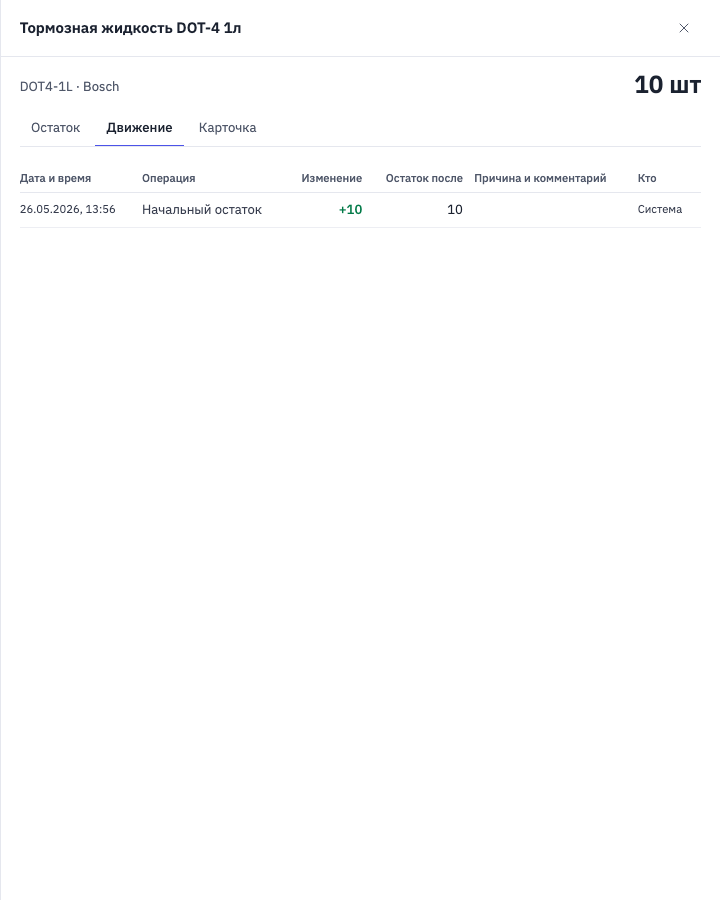
What is in the log
New entries are displayed at the top. Columns: “Date and time”, “Operation”, “Change” (with a sign: +200, −0.5), “Stock after”, “Reason and comment”, “Who”. On mobile devices, entries are displayed as cards. The first 30 entries are visible immediately, and the rest are loaded using the “Show more” button.
| Operation | When it appears |
|---|---|
| Receipt | An item is created with a quantity, or “Receive” is clicked |
| Write-off | “Write off” is clicked (with a reason), or an order becomes “Completed”. The reason “Written off in an order” and the order number are specified for the order |
| Write-off cancellation | “Cancel write-off” is clicked |
| Item card edit | The name, part number, brand, purchase price, unit, or minimum stock level is changed; a change of “0” is shown, and the comment indicates what was changed: “Purchase price 100 → 120” |
| Return from an order | An order is returned to work, a row is removed, or the quantity is reduced |
| Initial stock level | The item was created before the log was introduced; the entry shows the stock level at that time, and the author is “System” |
If “System” is shown in the “Who” column, the entry was created automatically.
Cancel a write-off
Next to a write-off, there is a “Cancel write-off” button. Click it and confirm: “Return 5 pcs to the warehouse?” → “Yes, cancel” (or “No”). The stock level will increase by the written-off quantity, a “Write-off cancellation” entry will appear in the log, and the original write-off will be marked “Cancelled”.
Rules:
- A write-off can only be cancelled once. If another write-off was made by mistake, cancel that write-off separately.
- A receipt cannot be cancelled using the button. If an excess quantity was received, write off the same quantity with the reason “Correction of receipt error”.
- A write-off made by an order cannot be cancelled using the button: return the order to the working status or remove the row, and the stock level will be restored automatically.
- A cancellation cannot be cancelled; make a new write-off instead.
The button is visible to users who have access to the parts warehouse; the person who cancelled it can be seen in the log.
“History” tab
Next to “Movement” in the item drawer, there is the “History” tab: who changed the item card itself and when. Entries “Creation”, “Change”, and “Deletion” include the “before → after” fields: “Name: Oil filter → MANN oil filter”, “Purchase price: 100 ₽ → 120 ₽”, “Minimum stock level: 2 → 5”; below them is the person who saved the changes. Receipts and write-offs are not repeated here—they are shown on the “Movement” tab. Entries are stored for 180 days.
Log and deletion
The log belongs to the item: when the item is deleted, it is deleted along with it (the system warns about this before deletion). Entries cannot be edited or erased manually.
Common issues
- “It says that the write-off has already been cancelled”. It has already been cancelled, as indicated by the “Cancelled” mark. The stock level has already been restored.
- “There is no ‘Cancel write-off’ button for a write-off from an order”. This is intentional: such a write-off is reversed by changing the order status.
- “There are no old movements in the log”. Before the log was introduced, movements were not recorded: for such items, the first entry is “Initial stock level”.