KPIs: Client Sources and Debts
Two sections of the Reports → KPIs screen answer the questions “which advertising brings in money” and “who owes us money.”
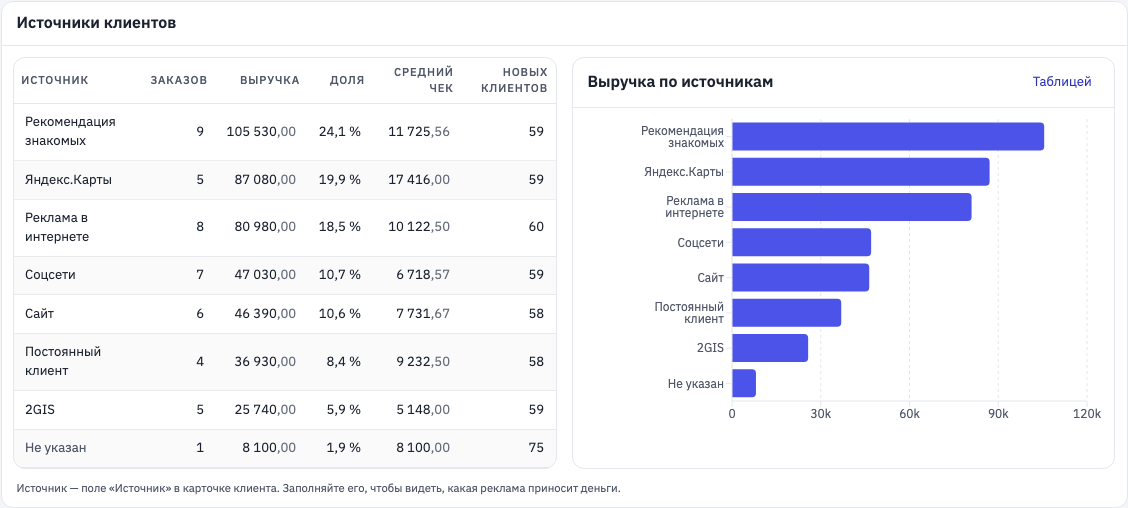
Client Sources
The “Client Sources” section shows the following metrics for each source over the selected period: “Orders”, “Revenue”, “Share”, “Average bill”, and “New clients”. The rows are sorted by revenue, and their shares add up to 100%. The “Revenue by Source” chart is displayed next to it: the eight largest sources and an “Other” row.
The source is taken from the “Source” field in the client card. This answers the question “where did the client hear about us” (a dropdown list: “Website”, “Recommendation from acquaintances”, “Social media”, etc.). If the field is empty (or the order has no client), the order is included in the “Not specified” row. The more often this field is filled in, the more accurate the picture: select the source when adding a client. The list of sources is configured at the Account level.
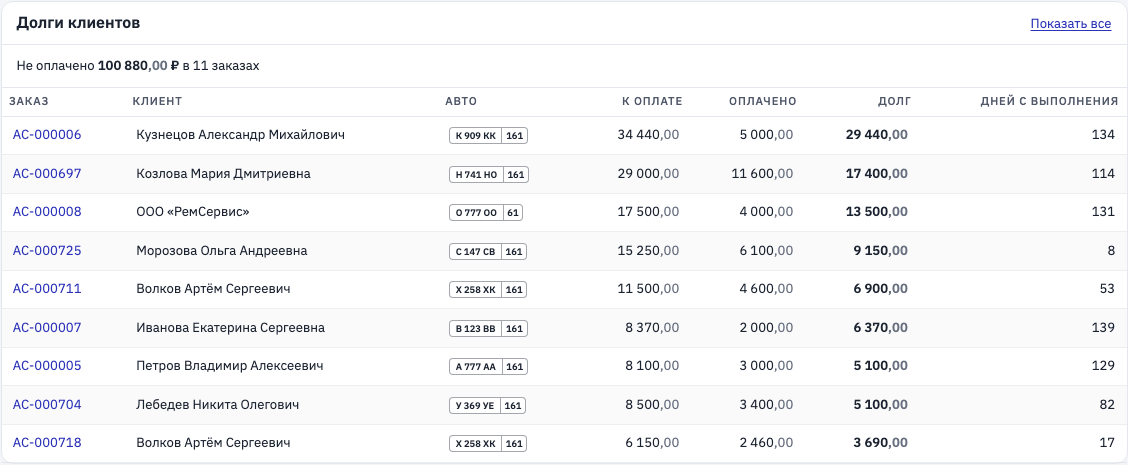
Client Debts
The “Client Debts” section shows how much clients have not yet paid for completed and closed orders: the total debt, number of orders, and ten largest debts. Each row includes the order, client, vehicle, “Amount due”, “Paid”, “Debt”, and “Days since completion”. The order number opens the order itself. The “Show all” link leads to the list of orders with the “With debt” filter enabled. If there are no debts, the section displays “No debts: all completed orders are paid.”
The monthly table includes the “Unpaid for the orders of the month” row: how much remains unpaid as of today for orders completed during that month. An overpayment does not reduce the debt for other orders.
The section and row are available if the Account has the “Order Payments” module enabled (it is included in the core Tariff). Without it, client payments are not recorded in the System, and there is nothing to display: the “Client Debts” section will not be shown.
FAQ
- “There is no ‘Client Debts’ section.” In Account → Tariff, check that “Order Payments” is enabled. If it is enabled but the section is missing, refresh the page.
- “All revenue is in ‘Not specified’.” The “Source” field has not been filled in on the client cards. Fill it in for new clients; for existing clients, you can update it as you communicate with them.
- “An order that the client seems to have paid is still marked as having debt.” Debt is “Amount due” minus “Paid” in the order’s “Payment” tab. Make sure the payment was applied to this order and was not recorded separately in the Cash desk.
- “I want the debts in Excel.” The export includes KPIs and sources; view debts in the list of orders with the “With debt” filter enabled.