Phone digest: daily and weekly results
To know how the day went without opening the application: in the evening, your phone receives the daily results, and on Monday morning — the results for the previous week. The figures are the same as those shown in Reports → KPIs (overview) for the same period.
What is included in the digest
Example: heading “Daily results · Tue 14 Oct”, text “Revenue 48,300 ₽ · 7 orders · avg. receipt 6,900 ₽ · 2 new clients · 3 requests · debts 94,500 ₽”.
- Revenue, orders, and average receipt — based on work orders with the “Completed” and “Closed” statuses completed that day (week).
- New clients — registered during the period.
- Requests — online booking requests submitted during the period; they are included if the account has the “Online booking” module enabled.
- Debts — how much clients owe at the time of sending (as in the “Client debts” block); they are included if the “Order payments” module is enabled and the debt is not zero.
- In the weekly results, ▲ or ▼ and a percentage for the week before last are shown next to revenue. The week is the previous week, from Monday to Sunday.
If there were no completed orders for the day, the text says: “There are no completed orders today”, followed by the remaining figures.
The digest contains only figures: no names, phone numbers, license plates, or service names, since the notification is visible on the lock screen. If there were no completed orders, new clients, or requests for the day, the digest is not sent.
What opens when you tap it
Tap the notification — the application will open Reports → KPIs with the relevant period already selected: for the daily results, that single day; for the weekly results, that week. If you have signed out, the screen will open immediately after you sign in.
Who receives it
The digest is part of the “KPIs” module: it must be enabled for the account (Account → Tariff), and the module itself is issued to SuperAdmin. It is received by:
- the account administrator;
- employees with the “Submodule access” permission for “Accounting > KPIs” — the permission is granted by the administrator in Roles.
The digest is sent only to phones where the mobile application is installed and notifications are allowed (What is available on mobile). If you disable the “KPIs” module, the digests will stop coming immediately.
How to enable and configure it
By default, the digest is enabled: the daily results arrive every day at 20:00, and the weekly results arrive on Monday at 9:00. You can change the settings here:
Settings → Notifications → “Push notifications” card → “KPI digest”
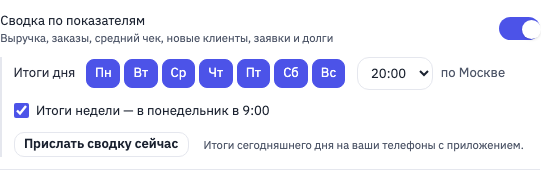
- The “Receive push notifications” master switch must be enabled, as well as the switch next to the “KPI digest” row. If you disable it, the digest is not sent, while other notifications remain unchanged.
- Daily results — day-of-week buttons (Mon … Sun): tap a day to disable or restore it. Next to them is the sending time from 06:00 to 23:30 in 30-minute increments, Moscow time. If all days are disabled, the message “Daily results are not sent” appears.
- “Weekly results — on Monday at 9:00” — a checkbox. Clear it if you only need the daily results.
The settings are personal: each user has their own settings, which are saved immediately (the message “Saved” appears in the card); they do not affect emails. If the digest is enabled later than the scheduled time, it will arrive within a few minutes — no more than once a day.
Send the digest now
The “Send digest now” button sends today’s results to your devices with the application without waiting until the evening. You can use it to check delivery and see what the notification looks like. The result appears below the button, for example, “Sent to devices: 1…”. It works even if the day is empty and the regular digest would not have arrived. You can tap it no more than once a minute.
FAQ
- The digest does not arrive in the evening. Check the following in order: notifications are allowed in the mobile application on your phone (version 1.2.0 or later); both the master switch and “KPI digest” are enabled in the card; the required day of the week is selected; the account has the “KPIs” module enabled and the employee has permission for it; there were completed orders, new clients, or requests for the day. Then tap “Send digest now”: the response “No phones…” means that you need to sign in to the application again and allow notifications.
- There is no “KPI digest” row in the card. The account administrator and employees with permission for “KPIs” can see it when the module is enabled. If an employee does not have permission, contact the account administrator.
- The figures do not match those in “KPIs”. The digest uses the same calculation rules, but covers 24 hours in Moscow time at the time of sending; an order completed later will be included in the next results. Debts are calculated at the time of sending.
- I want a different time or a time zone other than Moscow. The time is selected from the 06:00–23:30 list and is calculated in Moscow time; no other time zone is currently available.
- The “Send digest now” button responds with “The digest can be sent no more than once a minute”. Wait a minute and tap it again. The button does not work in “Sign in as” mode: the digest would be sent to the phone of the user you signed in as.
- The digest has arrived, but the application shows a different figure. If the orders changed after it was sent, open “KPIs” — the figures there are current.