KUDiR
The Income and Expense Ledger (KUDiR) is maintained automatically: payments for work orders, cash desk entries, bank statements, expenses, and supplier receipts are added to it on the day the money is received. The form follows FNS Order EA-7-3/816@. There is a USN ledger and a separate ledger for each patent. You can download the ledger in Excel and PDF formats and print it.
The calculation is based on your data, and you sign it. Review any disputed cases with your accountant.
Where to find it
Path: Accounting → Accounting & taxes → “Reports” tab → “KUDiR”. In the upper-right corner is “Year”. The “KUDiR” link is also available on the “Income from the beginning of the year” tile in the “Taxes and deadlines” tab.
Any employee with permission for the “Accounting and taxes” module can view and download it. Only the account administrator and employees with the “Maintain accounting records” permission can add or cancel lines manually.
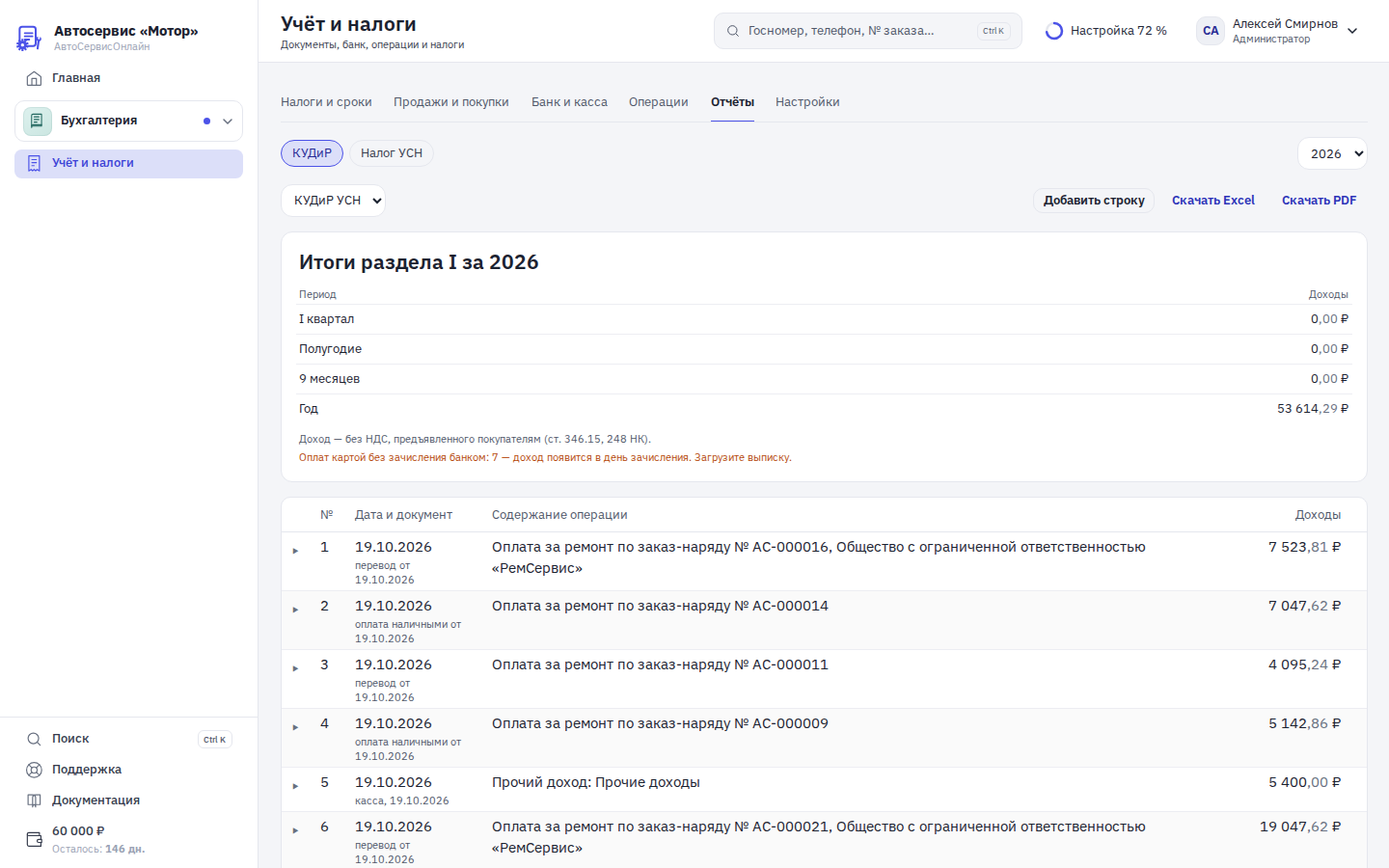
KUDiR and taxes are recalculated until the month is closed. If you correct a payment or expense retrospectively, the ledger and advance payment will change the next time you open the screen (at the top, “Updated at …”; the “Update” button takes effect immediately). A closed month has fixed figures: its KUDiR cannot be changed, and a manual line cannot be added for that month until it is reopened — see Month for the accountant and closing.
Which ledger to select
Select the ledger in the list on the left:
- “KUDiR USN” — if the USN “Income” or “Income minus expenses” regime applied during the year.
- “PSN Ledger: Patent No. …” — one for each patent in the year. Patents are added in the “Settings” tab — see Patent.
KUDiR is not maintained for AUSN: instead, the “Reports” section contains the “AUSN” section — see Taxes and deadlines. KUDiR is not yet calculated for OSNO and is marked “Coming soon”.
What is included in the ledger
Income (column 4) — money received:
- an order payment in cash — on the payment date;
- a payment by transfer — on the date of the posted bank statement line;
- a card payment — on the date credited by the bank (or on the date the customer paid — the “Income on card payment” setting in the “Settings” tab);
- other cash desk and bank statement receipts;
- a refund to the customer — as a negative amount on the refund date.
If you are subject to VAT under USN, income is recorded excluding VAT: a payment of 105 000 ₽ at 5 % VAT gives income of 100 000 ₽. At the bottom of the totals card, there will be a line “Income — excluding VAT charged to customers”.
If a patent is in effect on that day, part of the income goes to the patent ledger — according to the “Which income relates to the patent” setting. The remainder goes to the USN ledger.
Expenses (column 5) — only for USN “Income minus expenses”, and only paid expenses:
- expenses outside the cash desk and bank statement lines with the “USN expense” category;
- bank acquiring fees;
- parts and materials from suppliers: a part from inventory is recorded when it has been both paid for to the supplier and sold to the customer (the method is “Write off parts (USN 15 %)” in “Settings”: FIFO or weighted average);
- self-employed entrepreneur contributions — on the payment due date (28.12);
- employee contributions — paid monthly, from the “Labor and contributions for them” card in “Settings”.
The VAT rate deducted from a payment: if payment is made after the order is completed, it is based on the completion date (for 2025 shipments — 20/120, even if the money was received in 2026); for an advance payment, it is based on the payment date (22/122). If there is both a patent and USN “Income minus expenses”, self-employed entrepreneur and employee contributions are included in USN expenses in proportion to the income of the regimes, and the remainder reduces the patent. They are not counted twice.
Totals and lines
The “Section I totals for …” card shows income (and expenses) for Q1, the first half of the year, 9 months, and the full year. If accounting in the application did not start on January 1, the totals include opening data — below the table, there is a line “From the beginning of the year until … — opening data”. To enter it, see USN tax and advance payments.
Below the totals are warnings if anything was not included in the ledger:
- “Card payments not credited by the bank: N — income will appear on the credit date. Upload the statement.”
- “Parts sold without a supplier receipt: N — their cost was not included in expenses. Add the receipt.” — see Receipts from suppliers.
Below are the ledger lines: “No.”, “Date and document”, “Transaction description”, “Income”, “Expenses”. There are 50 lines per page. Click a line to expand it: the rule used to calculate it, “Transaction amount”, “VAT”, the share “under the patent”, and a link to the source — an order, bank statement, cash desk entry, expense, or receipt.
Under the lines for USN “Income minus expenses” is “Certificate for Section I and Section III”: 010 income for the year, 020 expenses, 040 income minus expenses, 041 loss, “Loss from previous years at the beginning of the year”, “Carried over in the current year”, “Balance for subsequent years”. The loss from previous years is entered in “Settings”, in the “Loss from previous years, ₽” field.
Add a line manually
If income or an expense is not listed in orders, the cash desk, or the bank statement, add it as a line:
- Click “Add line”.
- In the “Add KUDiR line manually” window, fill in “Date”, “Document” (date and number of the primary document), “Transaction description”, “Income, ₽” (a negative amount for a refund), and, for “Income minus expenses”, “Expense, ₽”.
- Specify the “Reason” — why the line is not present in the transactions. The accountant will see it.
- Click “Add”.
The line is marked “manually”. It cannot be deleted — only undone: ⋮ → “Cancel line”, with a reason. The line will be removed from the ledger but remain in the history.
Section II (fixed assets) — “Coming soon”. For now, record expenses on fixed assets as a Section I line on the last day of the quarter. The auto service does not complete Section V (trade levy).
Download and print
“Download Excel” and “Download PDF” provide the ledger for the selected year in the FNS form: title page information, Section I with totals for each quarter, the first half of the year, 9 months, and the full year, and, for “Income minus expenses”, the certificate and Section III. The form is always in Russian, regardless of the interface language.
FAQ
- The income in the ledger is lower than the amount paid by customers. You are subject to VAT, so income is recorded excluding VAT. Alternatively, part of the income went to the patent ledger. Expand the line — it shows the “Transaction amount”, “VAT”, and “under the patent” share.
- A card payment is missing from the ledger. Card income is recorded on the date credited by the bank. Upload and post the bank statement, or switch “Income on card payment” to “On the date the customer paid”.
- A payment was made today, but it is not in the ledger. The ledger is rebuilt when opened, but no more than once every 5 minutes. Open it a little later or click “Update” in the “Operations” tab (the “Maintain accounting records” permission is required).
- Why is a refund shown as a negative amount? KUDiR completion rules require this: a refund reduces income on the refund date, not on the payment date.
- Can a line from an order be corrected? No — correct the order, payment, or cash desk entry itself, and the ledger will be rebuilt. To change a manual line, cancel it and add it again.