ENP: QR code and bank payment file
Taxes and contributions are paid through a unified tax payment (ENP) to a single Treasury account. Each payment in the deadlines feed has a "QR code and payment file" button: the amount has already been calculated and the company details have been filled in. Pay using the QR code in the banking app or upload the ready-made payment file to online banking.
Where to find it
Path: Accounting → Accounting & taxes → "Taxes and deadlines" tab, "What to submit and pay" feed → the payment has a "QR code and payment file" button. The button is available for a USN advance payment and tax, self-employed entrepreneur contributions (fixed and 1%), and patent payment, provided the amount is greater than zero.
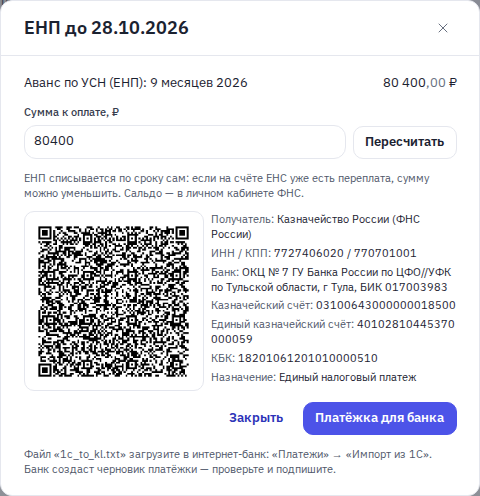
What is in the window
- Amount breakdown — payments in the feed for this deadline. There may be several payments on the same day, for example, a USN advance payment and one third of the patent payment—the total amount is combined.
- "Amount due, ₽" — you can adjust the amount and click "Recalculate": the QR code and payment file will be generated again.
- QR code and company details: recipient — the Treasury of Russia (Federal Tax Service of Russia), taxpayer identification number (TIN) and reason for registration at a branch (KPP), bank and bank identification code (BIC), treasury account, unified treasury account, ENP classification code of budget income (KBI), and the purpose "Unified tax payment".
How to pay
Using the QR code. In the banking app, select "Payment by QR code" and point the camera at the screen. The bank will fill in the payment—review the amount and confirm.
Using the payment file. Click "Bank payment file"—the "1c_to_kl.txt" file will be downloaded. In online banking, open "Payments" → "Import from 1C" (the menu item name depends on the bank) and upload the file. The bank will create a payment order draft—review and sign it.
In the payment file, the payer is your company or individual entrepreneur from Settings → Company details: TIN, settlement account, bank, BIC, and correspondent account. If any of these are missing, the button is inactive, and the window indicates that they need to be filled in.
If there is an overpayment on the ENS account
The ENP is debited by the tax authority according to the deadline automatically. If funds are already available on the unified tax account (an overpayment or a previous payment), you can pay less—adjust the amount. You can view the balance in your personal account on nalog.ru: the application cannot see it.
After payment
Upload the bank statement on the Bank and cash desk tab: the ENP payment will be distributed automatically, and the amount "ENP paid" will appear on the "ENP paid" tile and in the Month tab.
FAQ
- There is no "QR code and payment file" button. The payment amount is 0 (for example, a 0 advance payment—the contributions covered the tax), or the row is marked "Soon".
- Why is OKTMO 0 and the status 01? This is how an ENP payment is completed under the Federal Tax Service rules—for both companies and individual entrepreneurs.
- The bank does not accept the file. Find the option to import payment files from 1C or from a file in online banking. If it is unavailable, pay using the QR code or copy the company details from the window.
- The deadline has passed. The date in the payment file is today. The tax authority will calculate the penalty; the application does not calculate it.