Receiving parts
Receiving is the recording of parts arriving in the warehouse. It increases the Received and Warehouse (stock) values of the item and writes an “Income” entry in the movement log.
Where to find it
Path: Warehouse → Parts → click the item row → item drawer → “In stock” tab → “Receive” block.
How to receive parts
- Find the item in the list (search by “Part number, name, brand…”) and click the row.
- In the “In stock” tab, in the “Receive” block, enter the “Quantity”. For pieces and kits, it must be a whole number; for litres, kilograms, and metres, a fractional value is allowed (up to three decimal places, using a decimal point or comma).
- Optionally, enter a “Comment”, for example the delivery note number (up to 500 characters).
- Click Receive.
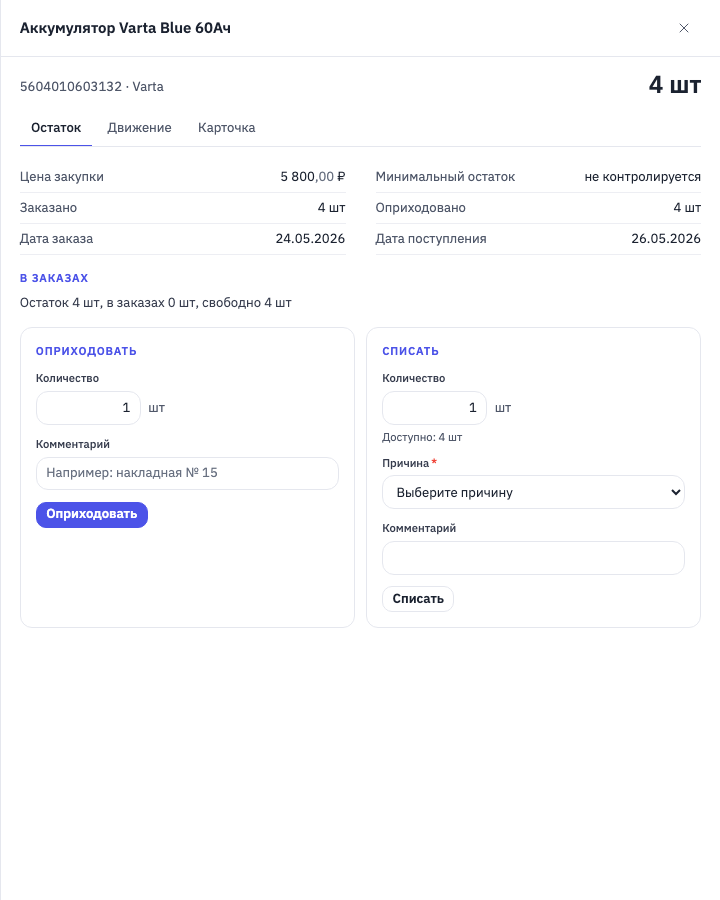
The receipt is recorded immediately; there is no separate “Save” button. The stock level in the drawer will be updated, and an “Income” entry with your name, time, and comment will appear in the “Movement” tab.
The values change as follows:
- Received (“Received”) — plus the quantity entered.
- Warehouse (“In stock”) — plus the quantity entered.
- Ordered — does not change; this is the quantity specified when the item was created.
- The status becomes “In stock”; if the stock level rises above the minimum, the “Time to order” label disappears.
When to use it
- Another batch of a part already listed in the list has arrived.
- The item was fully written off (stock 0, status “Ordered”), and the part has become available again.
- You need to return to the warehouse a quantity that was written off by mistake. If the incorrect write-off was made recently, it is better to click “Undo write-off” in the log: it will retain a clear pair of entries.
New items are received automatically
If the part is not yet in the list, add it using the + Item button in the Warehouse → Parts section: the new item is created as already received — “Ordered”, “Received”, and “Warehouse” are equal to the quantity entered. There is no need to receive it separately. For details, see Warehouse item list.
Common mistakes
- “Received more than was ordered.” The System allows this: “Ordered” does not change, and the status depends only on the stock level.
- “How do I undo a receipt?” There is no separate button. Write off the same quantity in the “Write off” block with the reason “Correction of receipt error”: both the receipt and its correction will remain in the log.
- “I cannot enter a fractional quantity.” The item’s unit is pcs or kit, so only whole numbers are allowed. Change the unit to l, kg, or m in the “Item card” tab.
- “I cannot change the stock level in the item card.” This is by design: the stock level changes only through receipts and write-offs, so that the log always matches the stock level.