KPIs: how the service is doing
One screen for the owner: how much the service earned, the average order value, how many labor hours were sold, the markup on parts, and how much money clients owe. All by month, with charts, with no report setup, and on your phone.
Where to find it
Path: Reports → KPIs.
The menu item is visible if the account has the "KPIs" module enabled (Account → Tariff, priced per employee per month, see Enabled modules) and the "Submodule access" permission for "Accounting > KPIs". An account administrator does not need this permission. An administrator assigns it to an employee under Roles: by default it is not granted to anyone.
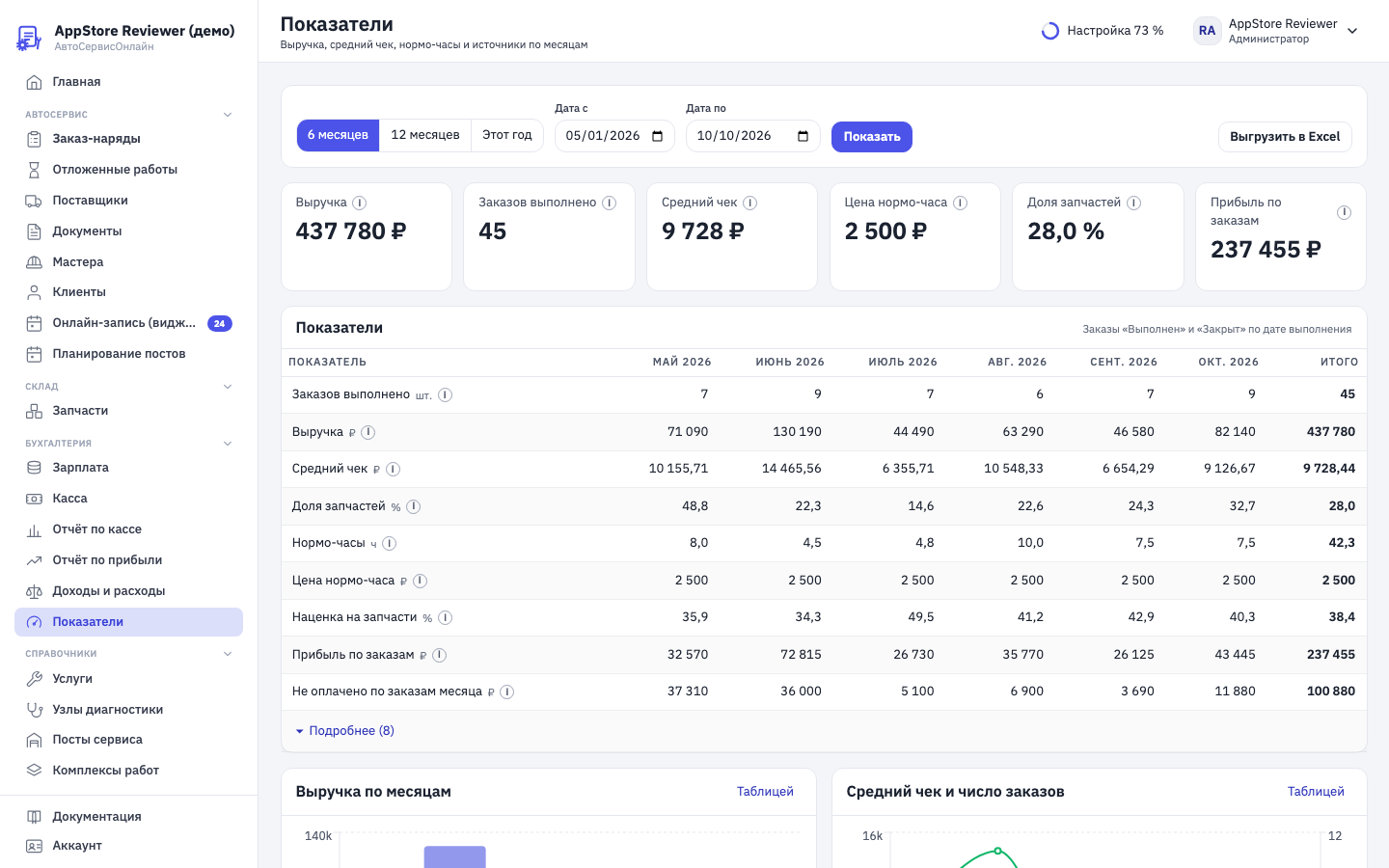
Period
At the top there are the "6 months", "12 months", "This year" buttons and the "Date from" and "Date to" fields. When you open it, the last 6 months including the current one are shown. If you select the dates manually, click "Show". The period cannot exceed 13 months: otherwise the screen will show the message "The period cannot exceed 13 months".
Tiles
Six tiles above the table: "Revenue", "Orders completed", "Average order value", "Labor hour price", "Parts share" and "Profit by orders". Below the value there is an arrow ▲ or ▼ and a percentage "compared to the previous period". The previous period is the same number of months immediately before the selected one (its dates are shown at the bottom of the screen). If there were no orders in the previous period, there is no arrow. An increase in the parts share and in the labor hour price is shown in grey: whether that is good or bad is up to you.
Monthly table
Rows are KPIs, columns are months and "Total". The first column is frozen; on a phone the table scrolls horizontally within the block.
Main rows: "Orders completed", "Revenue", "Average order value", "Parts share", "Labor hours", "Labor hour price", "Parts markup", "Profit by orders" and, if payments are enabled, "Unpaid for the orders of the month".
The "Details (8)" button expands more: "Labor", "Parts", "Parts purchasing", "Profit on parts", "Accrued to mechanics", "Payroll for labor", "New clients", "Repeat client orders". The screen remembers whether this is expanded for you.
"—" instead of a number means that it cannot be calculated: for example, there are no parts in a month, so there is no markup. "Total" is calculated from the total amounts for the period, not as an average across the months.
"i" tooltips
Every tile and row has an "i" icon: click it (or hover over it) to open the formula. The main ones:
| KPI | How it is calculated |
|---|---|
| Revenue | Labor + parts after discounts |
| Average order value | Revenue ÷ number of orders |
| Parts share | Parts ÷ revenue × 100 % |
| Labor hours, labor hour price | Based on labor in "H/H" mode only; labor "at a fixed price" does not add labor hours |
| Parts markup | (Sale − purchase) ÷ purchase × 100 % |
| Profit by orders | (Labor − accrued to mechanics) + (parts − purchase) |
Rent and other service expenses are not deducted from the profit.
Charts
Below the table there are three charts: "Revenue by month" (labor and parts), "Average order value and number of orders" and "Revenue by source". The "As a table" button shows the same figures as text. The colours change together with the interface theme.
Export to Excel
The "Export to Excel" button saves the file "Metrics_YYYY-MM-DD_YYYY-MM-DD.xlsx" for the selected period: the "Metrics" sheet (rows are KPIs, columns are months and "Total") and the "Sources" sheet. The numbers in the file are real numbers, so you can calculate with them.
Client ratings
If the Visit rating module is enabled, a "Client ratings" block appears under the KPI table: NPS, average rating, share of rated visits, a breakdown by service advisors and mechanics, and the latest comments. The block is visible to those who have the "Visit rating" permission; it is calculated for the same period as the table, and a "Ratings" sheet is added to the Excel file.
Which orders are counted
Orders with the "Completed" or "Closed" status. The month is determined by the order completion date (the moment when it was first moved to "Completed"), by Moscow time; an order falls into exactly one month. "New", "In progress", "Declined", deleted and old orders without a completion date are not counted.
"Profit by orders" matches "Total profit" in the profit report, and "Accrued to mechanics" matches "Accrued" in the payroll report, if the period is the same.
FAQ
- "The 'KPIs' item is missing from the menu". Account administrator: enable the module in Account → Tariff (for a module that is not connected, the menu shows a row with a lock and "Connect"). Employee: you need the "Submodule access" permission for "Accounting > KPIs".
- "There are no arrows on the tiles". There were no completed orders in the previous period (or the value was zero), so there is nothing to compare with.
- "The figures do not match the profit or payroll report". Review that the period and the report filters are the same. Reports are calculated by the completion date, just like "KPIs". The discrepancy in payroll is caused by lines removed from the calculation; in profit — by the mechanic, service or vehicle filters. An order that was returned from "Completed" to another status disappears from all reports.
- "The profit is lower than I expected". Accruals to mechanics and the purchase of parts are deducted from it, but rent and other expenses are not.
- "There is no 'Client debts' block and no 'Unpaid' row". They work when the "Order payments" module is enabled. See Sources and debts.